
This section lists the steps to take a snapshot and delete the same.
Taking a snapshot creates a new snapshot entry in the SQL Server dSource’s Timeflow. You can use either Snapshot (Default) or Snapshot with Parameters option for taking the snapshot.
Snapshot (Default)
Perform the following steps to take a snapshot:
-
Log in to the Delphix Management application.
-
Click Manage and select Datasets from the dropdown list.
-
Select the dSource you want to Snapshot.
-
Click the arrow next to the Camera icon.
-
From the Snapshot dialog box, select Yes.
-
Navigate to the Timeflow tab and click View: All snapshots to verify the Snapshot you just created.
Snapshot with Parameters
Perform the following steps to take a snapshot:
-
Log in to the Delphix Management application.
-
Click Manage and select Datasets from the dropdown list.
-
Select the dSource you want to Snapshot.
-
Click the arrow next to the Camera icon.
-
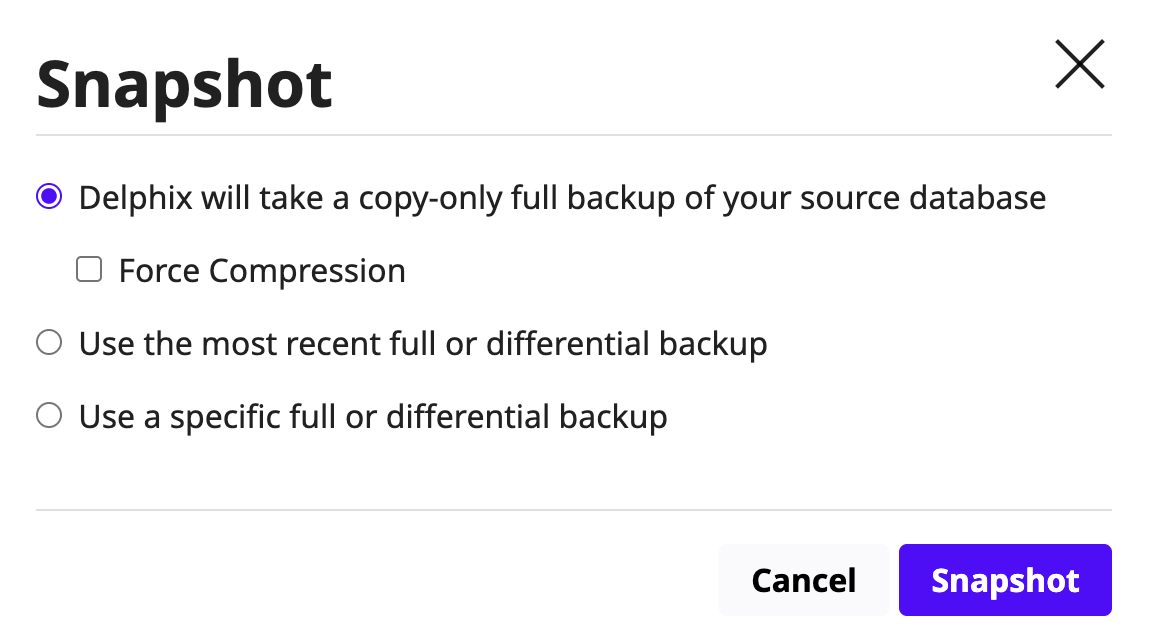
From the Snapshot dialog box, select one of the following:
-
Delphix will take a copy-only full backup of your source database
-
When enabled, the Delphix Engine will take a full copy-only backup of the database and use it to perform the sync operation.
-
-
Use the most recent full or differential backup
-
Delphix will automatically detect the most recent full or differential backup and use it to perform the sync operation.
-
Ensure that Backup Paths are configured correctly — these are the locations where Delphix will look for backups for ingestion.
-
-
Use a specific full or differential backup
-
SQL Server database can be loaded from a specific full backup of the source database as indicated by the Backup Set UUID.
-
-
-
Navigate to the Timeflow tab and click View: All snapshots to verify the Snapshot you just created.
Deleting Snaphots
To delete a snapshot:
-
Navigate to the Timeflow tab.
-
Select the snapshot you want to delete.
-
From the Actions menu (...), select Delete Snapshot.
-
In the Delete Snapshot dialog box, click Delete.
-
Navigate to the Timeflow tab and click View: All snapshots to verify that the snapshot has been deleted.