
Virtual Databases (VDB) are virtualized copies of dSource. A VDB can be created using a snapshot on the dSource timeflow.
Prerequisites
-
Require a linked dSource with at least 1 snapshot.
-
Require a Target environment added to Delphix.
-
A MSSQL Linux with the same version as the source database must be installed in the Target environment.
Provisioning a VDB
-
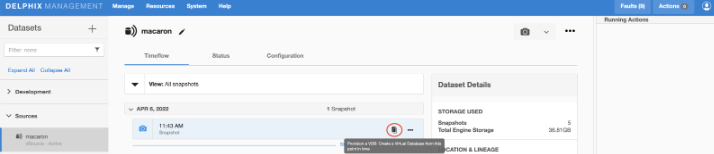
On the dSource Timeflow, click on the Provision action on the snapshot that you want to use for the VDB (highlighted below).
-
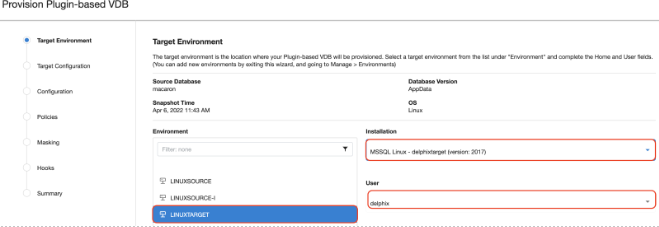
Select the target host from the dropdown on which VDB needs to be created.
-
If there are multiple MSSQL Linux repositories on the host, select the one that matches the source database version.
-
If there are multiple OS users on the host, select the user you want to use.
-
-
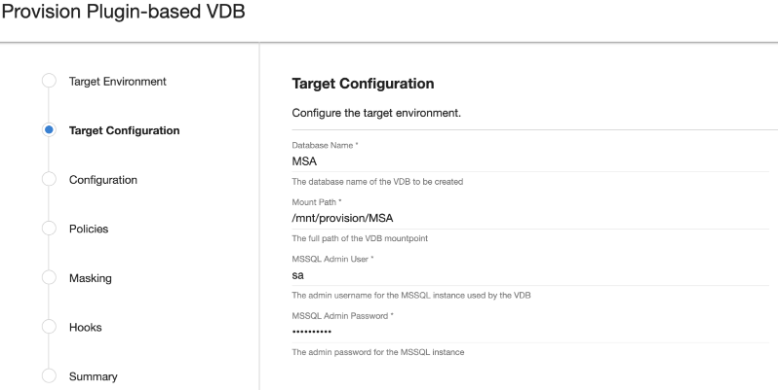
Enter the following values for the target configuration:
-
Database Name This is the database user for the VDB. Delphix will use this user to manage the VDB. It is recommended that you use the same user account that was used by the staging database.
-
Mount Path This is the mount directory for Delphix VDB on the Target host. This location should be unique and empty.
-
MSSQL user (with sysadmin role) This is the sysadmin database user for the MSSQL instance. Delphix will use this user to manage the VDB.
-
Database Password for the MSSQL provided user.
-
-
On Configuration screen, add VDB name, select Target group, check Auto VDB Restart check box and select Next.
-
On Policies screen, add any required policies and select Next.
-
If you want to Mask the VDB, select the required configuration this screen and select Next.
-
On Hooks screen, add any required Hooks and select Next.
-
Preview the summary and select Submit.
-
Once the VDB is created successfully, you can review the datasets on Manage > Datasets > vdb Name.