
This topic describes how to migrate a TDE-enabled virtual pluggable database (vPDB) or PDB that uses a Hardware Security Module (HSM) keystore to one that uses a software keystore. The procedure involves several manual steps performed both outside of Delphix and within the Delphix CLI. It applies to multitenant database configurations, including CDBs and vCDBs.
Prerequisites
Review the following requirements and recommendations before you begin:
-
This procedure includes operations performed outside of Delphix. If any errors or missteps occur during those external operations, Delphix cannot remediate them. Delphix strongly recommends that a person familiar with Oracle TDE—for example, a database administrator (DBA)—performs these steps.
-
Create a full backup of the databases before beginning the conversion.
-
This process is supported only for databases running Oracle Database 18c or later.
-
This process applies only to databases configured in united keystore mode. Databases using isolated keystore mode are not supported.
-
This process assumes that the CDB or vCDB is configured for TDE using the
WALLET_ROOTinitialization parameter. If your CDB or vCDB is configured for TDE using theENCRYPTION_WALLET_LOCATIONparameter insqlnet.ora, the Oracle commands may differ slightly. Refer to the appropriate Oracle documentation for details about those configuration differences.
Procedure
To migrate an HSM keystore-based vPDB or PDB to a software keystore-enabled vPDB or PDB, complete the following steps in order.
1. Shut down RAC instances
If the container database to be migrated is an Oracle Real Application Clusters (RAC) database, keep only one instance running—this instance is used for keystore migration—and shut down all other instances. If the container database is a single-instance database, skip this section and continue to step 2: Migrate the HSM keystore to a software keystore outside Delphix.
-
If the container database is a physical CDB that has no vPDBs, connect to the instances to be shut down using SQL*Plus and shut them down with the following command:
SHUTDOWN IMMEDIATE. -
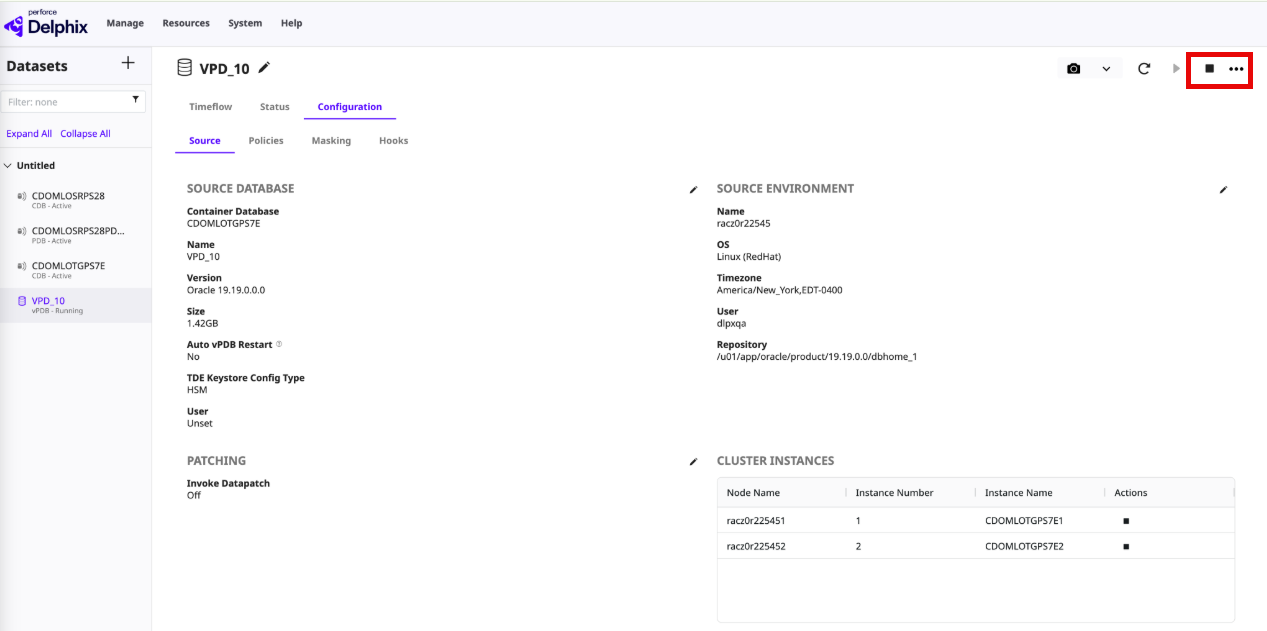
If the container database is a virtual CDB, or a physical CDB with one or more vPDBs, stop the vPDB instances from the Delphix Engine UI. Select the vPDB, click Configuration > Source, and then click the Stop icon in the Actions column of Cluster Instances for the instance you want to stop.
-
If there are multiple vPDBs in the CDB or vCDB, repeat the previous step for each vPDB.
-
If a physical CDB contains both physical PDBs and virtual PDBs, first shut down the vPDBs as described above, then connect to the CDB with SQL*Plus and shut down the CDB with
SHUTDOWN IMMEDIATE.
2. Migrate the HSM keystore to a software keystore outside Delphix
For RAC databases, perform the steps in this section on the single running instance. Confirm that only one instance is running and that all other instances are shut down.
Before you begin, make a copy of the current auto-login wallet file (cwallet.sso) and the software keystore file (ewallet.p12), if one exists.
-
Connect to the CDB/vCDB using SQL*Plus.
-
Check the current wallet root by running
SHOW PARAMETER wallet_root. For a RAC database, make sure thewallet_rootdirectory is shared across all nodes and that theoracleuser has read and write permissions on it. -
Create a new software keystore (if there is an existing
ewallet.p12, remove it or move it to another location):ADMINISTER KEY MANAGEMENT CREATE KEYSTORE '<path-to-current-wallet-root>/tde' IDENTIFIED BY "<password-for-new-software-keystore>"; -
Update the TDE_CONFIGURATION parameter:
ALTER SYSTEM SET TDE_CONFIGURATION="KEYSTORE_CONFIGURATION=FILE|HSM" SCOPE=BOTH; -
Reverse-migrate the HSM keystore to the software keystore:
ADMINISTER KEY MANAGEMENT SET ENCRYPTION KEY IDENTIFIED BY "<password-of-new-software-keystore>" REVERSE MIGRATE USING "<HSM_user>:<HSM_user_password>" WITH BACKUP USING 'DLPX'; -
Create a new auto-login keystore that connects to the software keystore (if there is an existing
cwallet.sso, remove it or move it to another location):ADMINISTER KEY MANAGEMENT CREATE AUTO_LOGIN KEYSTORE FROM KEYSTORE '<path-to-current-wallet-root>/tde' IDENTIFIED BY "<password-of-new-software-keystore>"; -
Close the password-based software keystore:
ADMINISTER KEY MANAGEMENT SET KEYSTORE CLOSE IDENTIFIED BY "<password-of-new-software-keystore>" CONTAINER=ALL; -
Query the active keys for CDB$ROOT and all of its vPDBs/PDBs. Record the results; the
key_idvalues are used in later steps.SELECT con_id, key_id FROM v$encryption_keys ORDER BY con_id;The following is an example of the query results:
CON_ID KEY_ID ---------- -------------------------------------------------------------------- 1 AUvLJIViSE9Xv7WKOATdBFYAAAAAAAAAAAAAAAAAAAAAAAAAAAAA 3 ARtoNj3c6k8bv9yziIEsQB4AAAAAAAAAAAAAAAAAAAAAAAAAAAAA 4 AXDBKI6hgE8ov309OhLd61cAAAAAAAAAAAAAAAAAAAAAAAAAAAAA 5 AUbHMw7mxk+/v/1tOt30Z9oAAAAAAAAAAAAAAAAAAAAAAAAAAAAA -
If any PDB/vPDB in the CDB/vCDB is used as a dSource, copy the software keystore file (
ewallet.p12) to the parent TDE keystore directory on the target host used as the provisioning target. Repeat this copy each time you rekey the CDB or any PDB/vPDB.In a RAC environment, if the directory containing the software keystore (ewallet.p12) and the auto-login keystore (cwallet.sso) is not shared across all nodes, copy both files to<wallet_root>/tdeon every node. Repeat this copy whenever a rekey occurs on the CDB or any of its vPDBs or PDBs.
3. Update Delphix properties using the CLI
Perform all steps in this section from the Delphix CLI using the admin user or another user with equivalent administrative privileges.
-
Update the CDB/vCDB's
tdeKeystoreConfigTypeandtdeKeystorePasswordproperties. For example:YourEngine sourceconfig 'YourCDB' update *> set tdeKeystoreConfigType=FILE YourEngine sourceconfig 'YourCDB' update *> set tdeKeystorePassword=<password-of-new-software-keystore> YourEngine sourceconfig 'YourCDB' update *> commit Dispatched job JOB-216 SOURCE_CONFIG_UPDATE job started for "YourCDB". SOURCE_CONFIG_UPDATE job for "YourCDB" completed successfully.The job returns an informational message advising you to update the client secret in the auto-login wallet. This message is informational and can be safely ignored.
-
(vCDB only) Update the tdeKeyIdentifier property. For example:
YourEngine source 'YourVCDB' update *> set tdeKeyIdentifier=AUvLJIViSE9Xv7WKOATdBFYAAAAAAAAAAAAAAAAAAAAAAAAAAAAA
YourEngine source 'YourVCDB' update *> commit
    Dispatched job JOB-217
    SOURCE_UPDATE job started for "YourVCDB".
    SOURCE_UPDATE job for "YourVCDB" completed successfully.
Set
tdeKeyIdentifierto thekey_idofCDB$ROOT (CON_ID=1)that you recorded in the previous section. -
(vPDB only) Update
parentTdeKeystorePath,parentTdeKeystorePassword, andtdeKeyIdentifierfor every vPDB in the CDB/vCDB. For example:YourEngine source 'YourPDB' update *> set parentTdeKeystorePath=/<path-to-dsource-tde-keystore> YourEngine source 'YourPDB' update *> set parentTdeKeystorePassword=<password-of-parent-tde-keystore> YourEngine source 'YourPDB' update *> set tdeKeyIdentifier=AUbHMw7mxk+/v/1tOt30Z9oAAAAAAAAAAAAAAAAAAAAAAAAAAAAA YourEngine source 'YourPDB' update *> commit Dispatched job JOB-218 SOURCE_UPDATE job started for "YourPDB". SOURCE_UPDATE job for "YourPDB" completed successfully.
In this example:
-
parentTdeKeystorePathis the path of the directory where the dSource TDE keystore was copied. -
parentTdeKeystorePasswordis the password of the parent (dSource) TDE keystore. -
tdeKeyIdentifieris thekey_idof the vPDB that you recorded in the previous section.
4. Start the remaining RAC instances
For a RAC database, start the instances that were shut down before the migration. Start physical CDB/PDB instances using SQL*Plus. Start vPDB instances from the Delphix Engine UI.
5. Take a snapshot of the PDB or vPDB
At this point, the CDB/vCDB and its PDBs/vPDBs have been successfully converted from an HSM keystore to a software keystore. Delphix strongly recommends taking a snapshot of the PDBs (when they are used as dSources) or vPDBs now, so that dependent vPDBs can later be refreshed or rewound to this snapshot, or to a point in time after it.
Supported and unsupported Delphix operations after migration
After a vPDB is converted from an HSM keystore to a software keystore, if you need to refresh the vPDB, you must first convert its parent dSource PDB from an HSM keystore to a software keystore by following the steps in the Procedure section above.
After a CDB/vCDB and its associated PDBs/vPDBs have been migrated from an HSM keystore to a software keystore, Delphix operations fall into the following three categories.
Supported operations
The following operations are always supported after the migration:
-
Lifecycle operations for virtual objects (vPDB or vCDB only): Stop, Start, Disable, Enable, and Delete. For physical PDBs/CDBs, perform lifecycle operations outside of Delphix using SQL*Plus.
-
Creating a new incremental or full snapshot of the migrated PDB/vPDB.
Conditionally supported operations
The following operations are supported only after a snapshot of the migrated PDB/vPDB has been taken (see step 5 ‘Take a snapshot of the PDB or vPDB’ in the Procedure section above):
-
Provisioning or refreshing a vPDB to any snapshot of the dSource PDB/vPDB that was taken after the migration.
-
Provisioning or refreshing a vPDB to a point in time of the dSource PDB/vPDB that is later than the first snapshot taken after the migration.
-
Rewinding a migrated vPDB to any snapshot that was taken after the migration.
-
Rewinding a migrated vPDB to a point in time that is later than the first snapshot taken after the migration.
Unsupported operations
The following operations are not supported after the migration:
-
Provisioning or refreshing a vPDB from a snapshot of the dSource PDB or vPDB that was taken before the migration.
-
Provisioning or refreshing a vPDB to a point in time of the dSource PDB or vPDB that is before the migration.
-
Rewinding a migrated vPDB to a snapshot that was taken before the migration.
-
Rewinding a migrated vPDB to a point in time before the first snapshot taken after the migration.