
Perform the following steps to provision a MySQL VDB.
-
Login to the Delphix Management application.
-
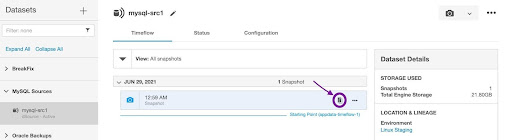
Navigate to the Manage > Datasets page and select a dSource or VDB dataset.
-
Under the Timeflow tab, identify a snapshot, hover over it, and select the Provision a VDB button.
-
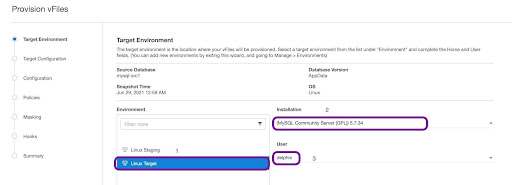
On the Target Environment page, perform the following actions:
-
From the Environment dropdown list, select a compatible target environment. This will dynamically populate the other properties.
-
From the Installation dropdown list, select the specific MySQL instances that you want to use.
-
The VDB target environment’s MySQL version should be the same as the dSource environment’s MySQL version. Otherwise, you will receive an error message. Refer to the Troubleshooting section for more information.
-
-
From the User dropdown list, select the environment user that matches the MySQL Instance Owner as configured in the prerequisites.
-
-
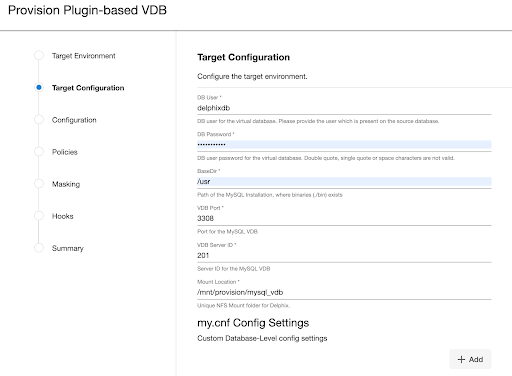
On the Target Configuration page, fill in the following values:
-
DB User: It is the database user for the VDB. Delphix Continuous Data Engine will manage the VDB using this user. You must provide the same user account used by the staging database.
-
DB Password: It is thepassword for the VDB database user.
-
VDB root credential: When
vdb_passis configured, its value becomes the VDB root credential during provisioning. This applies when you provision from a dSource or a VDB snapshot. -
BaseDir: It is theMySQL installation directory.
-
VDB Port: It is the Port number used by the VDB. This port should not be used by any other application or MySQL server.
-
VDB Server ID: It is the MySQL server ID for the VDB. This server-id must be non-zero.
-
Mount Location: It is the mount directory for Delphix VDB on the Target host. This location should be unique and empty. On Linux and Unix hosts, this mount path must be the full path and not include symlinks.
-
(Optional) my.cnf Config Settings: It allows users to specify MySQL configuration properties while creating a VDB.
-
Restricted parameters cannot be added to the configuration settings as the connector forms these parameter values. Find the full list of restricted parameters in our staging and target environment requirements documentation.
-
Any
my.cnfconfig parameters added through a VDB’s configuration settings overwrites all other inherited or default values of the same name.
-
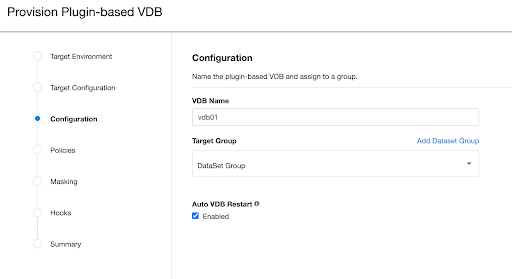
- On the Configuration screen, add the VDB name, select the Target Group, check the Auto vFiles Restart checkbox, and click Next.
-
(Optional) On the Policies page, select a previously defined VDB Snapshot Policy or the Use group policy checkbox.
-
(Optional) On the Masking page, enable the Mask this VDB checkbox to mask the database following a successful provision.
-
This feature may be disabled or unavailable if the chosen snapshot is already masked or the Delphix Continuous Compliance Engine is disconnected.
-
-
(Optional) On the Hooks page, select a Hook Point and then click the Plus icon (+)to add a script that you want to run. You have the flexibility to define scripts to run at multiple hook points in the process.
-
In the Summary tab, review the configuration profile for your VDB.
-
Click Submit.
Once the VDB is created successfully, you can review the datasets on the Manage > Datasets screen in the left-hand panel. You have now provisioned a MySQL VDB. When vdb_pass is configured, use its value as the VDB root credential. You can connect a running application and share it with your end users. Connection information can be found in the VDB’s Configuration Custom tab and within its target environment’s database.
Updating custom configuration properties
MySQL connector UI allows you to add/update/delete custom configuration properties after provisioning a VDB. Go to Configuration > Custom and click the Pencil icon to edit the fields. You can update parameters under my.cnf Config Settings section, as shown in the screenshot below.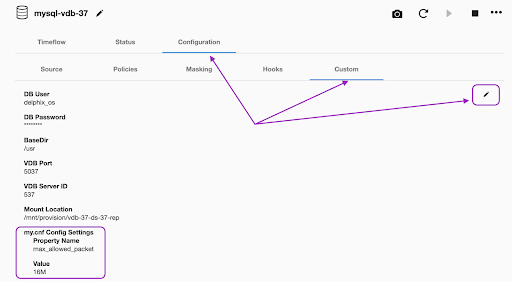
Restricted parameters cannot be added to the configuration settings as the connector forms these parameter values. Find the full list of restricted parameters in our staging and target environment requirements documentation.
The VDB must be disabled/enabled for the updated parameters to take effect.