
To configure the SSL, TLS, KMIP and LDAP configuration parameters for offlinemongodump, follow these steps:
Prerequisites
-
LDAP verification
[delphix@cert-mongo809-tgt bin]$ ./mongoldap --ldapServers "atqacloner.dcol2.delphix.com:389" --ldapTransportSecurity none --ldapBindMethod simple --ldapUserToDNMapping "[ { match : '(.+)', ldapQuery: 'dc=ldap,dc=mongodb,dc=local??sub?(uid={0})' } ]" --ldapQueryUser="cn=admin,dc=ldap,dc=mongodb,dc=local" --ldapQueryPassword ‘delphix’ --user john --ldapAuthzQueryTemplate "{USER}?memberOf?base" Running MongoDB LDAP authorization validation checks... Version: 7.0.20 Checking that an server has been specified... [OK] LDAP server(s) provided in configuration Checking that the DNS names of the LDAP servers resolve... * LDAP Host: atqacloner.dcol2.delphix.com was successfully resolved to address: atqacloner.dcol2.delphix.com [OK] All DNS entries resolved Connecting to LDAP server... [FAIL] Attempted to bind to LDAP server without TLS with a plaintext password. * Sending a password over a network in plaintext is insecure. * To fix this issue, enable TLS or switch to a different LDAP bind mechanism. {"t":{"$date":"2025-12-01T09:29:33.732Z"},"s":"I", "c":"ACCESS", "id":24051, "ctx":"main","msg":"LDAPAPIInfo","attr":{"infoVersion":1,"apiVersion":3001,"protocolVersion":3,"extensions":["X_OPENLDAP","THREAD_SAFE","SESSION_THREAD_SAFE","OPERATION_THREAD_SAFE","X_OPENLDAP_REENTRANT","X_OPENLDAP_THREAD_SAFE"],"vendorName":"OpenLDAP","vendorVersion":20608,"options":{"slowLocking":false,"async":0,"tlsPackage":"OpenSSL","mozNSSCompat":false}}} Checking for Active Directory and Global Catalog Usage... [OK] Done checking for Active Directory and Global Catalog Usage Parsing MongoDB to LDAP DN mappings... [OK] MongoDB to LDAP DN mappings appear to be valid Checking if LDAP authorization has been enabled by configuration... [OK] LDAP authorization enabled Parsing LDAP query template... [OK] LDAP query configuration template appears valid Executing query against LDAP server... [OK] Successfully acquired the following roles on the 'admin' database: -
At source database, make sure you have the privileges below set for the role of LDAP user on admin database.
* cn=users,ou=groups,dc=ldap,dc=mongodb,dc=localclusterMonitor, backup, readAnyDatabase -
Assign below roles and permissions on Source database from where the
mongodumpbackups are taken.$ mongosh "mongodb://dlpxadmin:delphix@mkk-prod-src.dcol1.delphix.com:28501/admin?" --quiet --eval 'db.createRole({role: "cn=users,ou=groups,dc=ldap,dc=mongodb,dc=local", privileges: [], roles: ["clusterMonitor","backup", "readAnyDatabase"]})' Where, "cn=users,ou=groups,dc=ldap,dc=mongodb,dc=local" is the ldap role of the given user. $ mongosh "mongodb://dlpxadmin:delphix@mkk-prod-src.dcol1.delphix.com:28501/admin?" --quiet --eval 'db.grantPrivilegesToRole("cn=users,ou=groups,dc=ldap,dc=mongodb,dc=local",[{resource: { cluster: true }, actions: [ "shutdown" ]}])' Where, "cn=users,ou=groups,dc=ldap,dc=mongodb,dc=local" is the ldap role of the given user. -
Take backup using
mongodump$ mongodump --uri="mongodb://dlpxadmin:delphix@mkk-prod-src.dcol1.delphix.com:28501" --gzip -o /bigdata/offlinemongodump_new -
By default it includes "admin" database backup. Confirm it once.
$ls /bigdata/offlinemongodump_new/admin/*
/bigdata/offlinemongodump_new/admin/system.roles.bson.gz /bigdata/offlinemongodump_new/admin/system.users.metadata.json.gz
/bigdata/offlinemongodump_new/admin/system.roles.metadata.json.gz /bigdata/offlinemongodump_new/admin/system.version.bson.gz
/bigdata/offlinemongodump_new/admin/system.users.bson.gz /bigdata/offlinemongodump_new/admin/system.version.metadata.json.gz
Linking the VDB
Follow the sequence of the screenshot to link the MongoDB data sources:
KMIP key file permissions must be 600. For example: /home/delphix/keyfile/encdbkeyfile in the below screenshots.
-
Select the Source database.
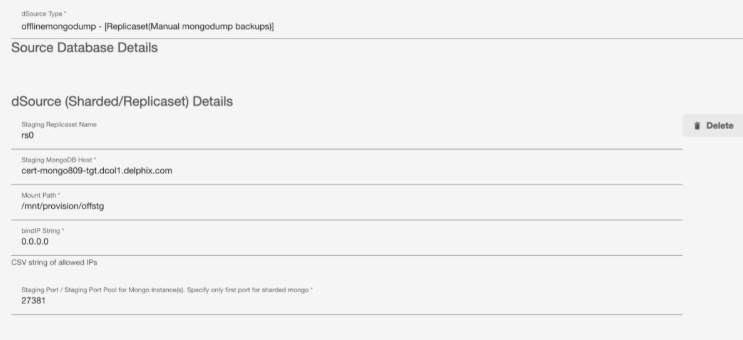
-
Select the Enable SetParams check box and enter the required values.
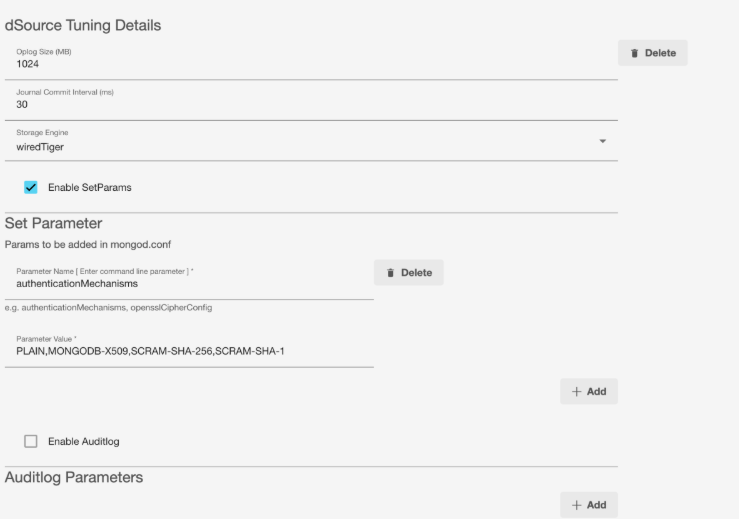
-
Enter the mongodumb backup/tuning and mongostore tuning parameter details.
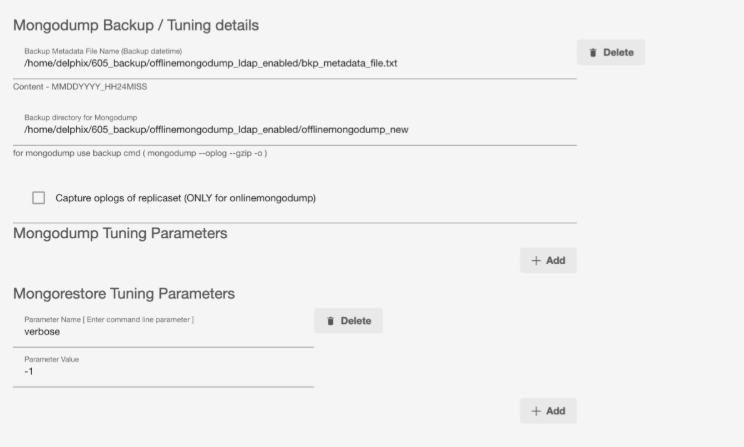
-
Select the Enable Authentication check box and enter the required values.
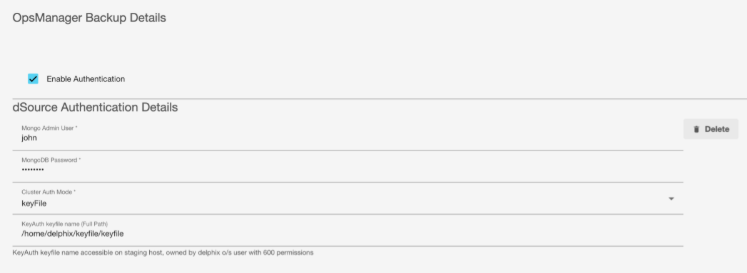
-
Select the Enable SSL/TLS check box and enter the required values.
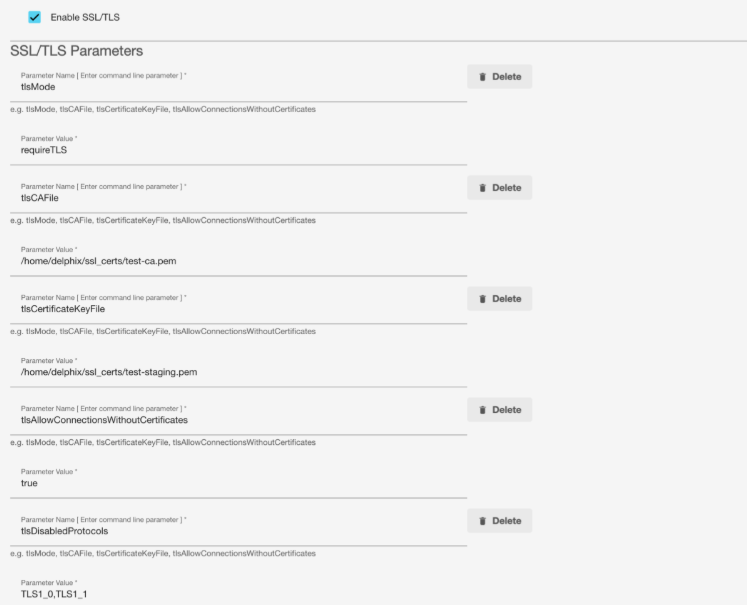
-
Select the Enable LDAP check box and enter the required values.
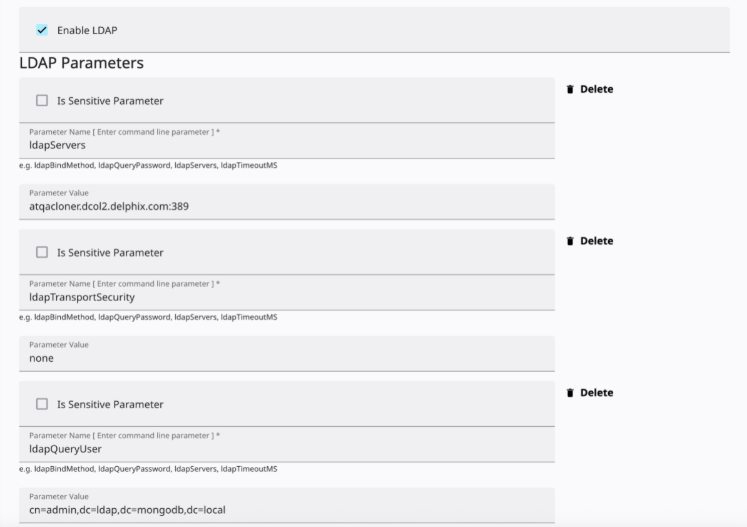
-
(optional) Enter the Is Sensitive Parameter details.
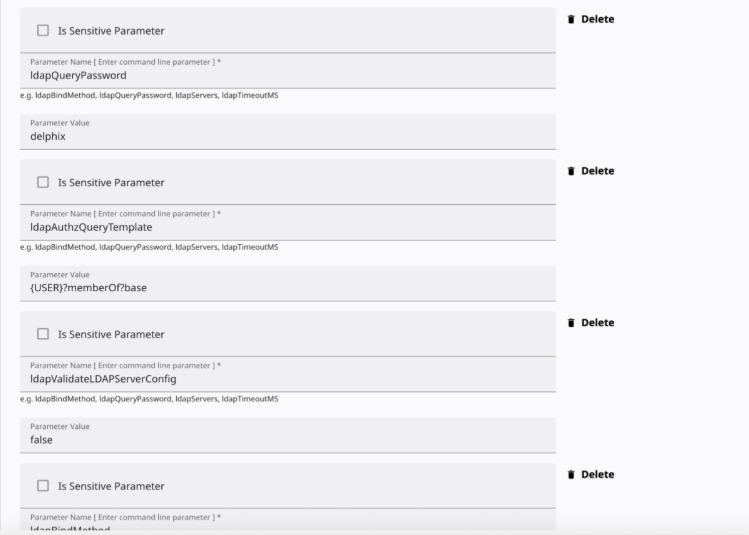
-
Select the Enable data encryption check box and enter the required values.
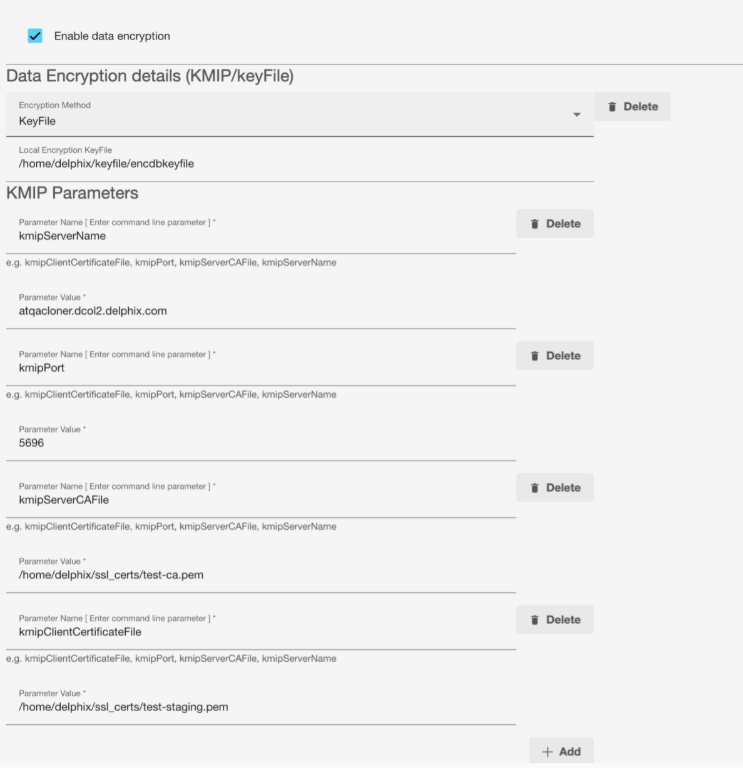
-
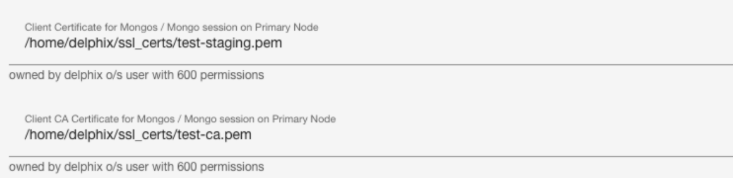
Enter the Client Certificate and Client CA Certificate values for the Mongo session on the Primary Node.
-
Set ldapTransportSecurity to tls if ldap server expects TLS/SSL communication.
-
If ldapQueryPassword contains special characters, enclose it with single quotes.
-
Click Save.
The same parameters will work for operations like Resync, Snapshot, Disable, Enable and Delete dSource.
Provisioning the VDB
To provision a VDB, follow these steps:
-
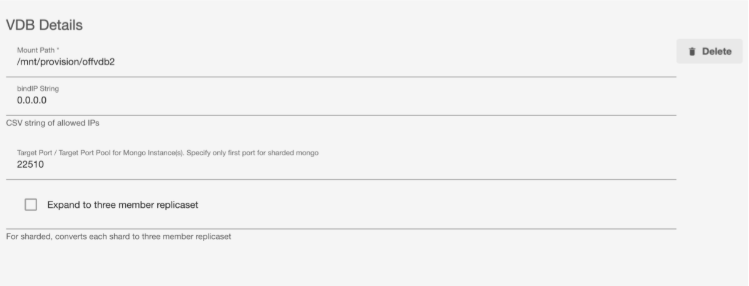
Enter the VDB details.
-
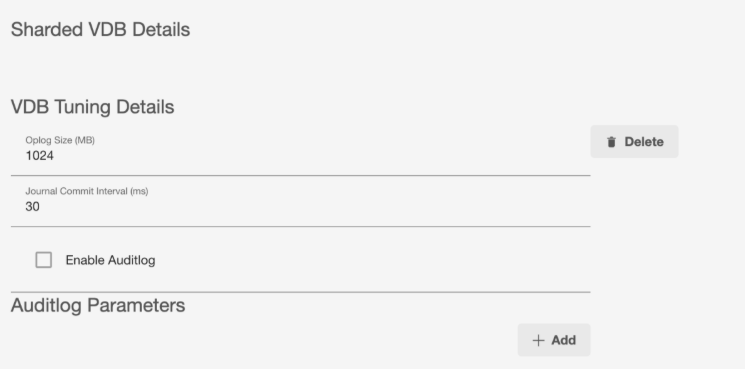
Enter the Shared VDB details.
-
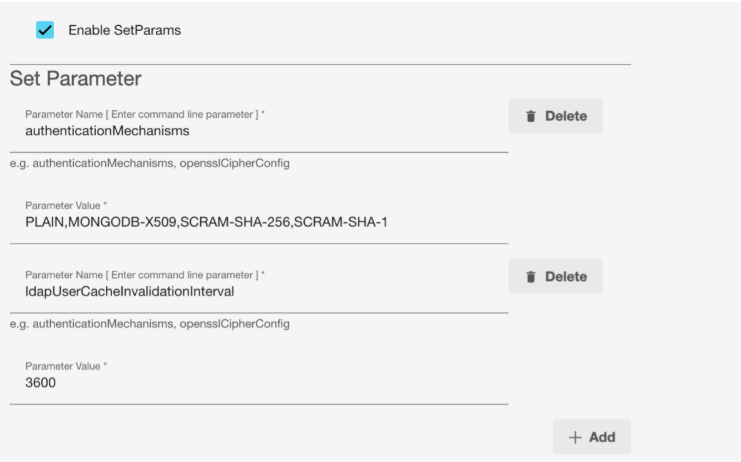
Select the Enable SetParams check box and enter the required values.
-
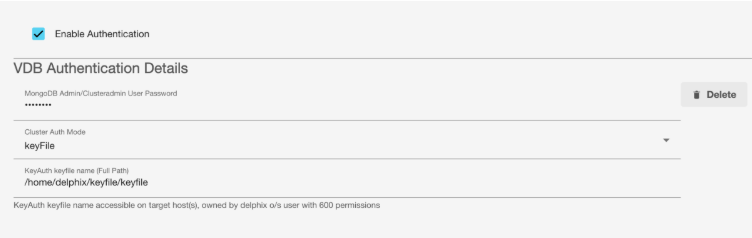
Select the Enable Authentication check box and enter required values.
-
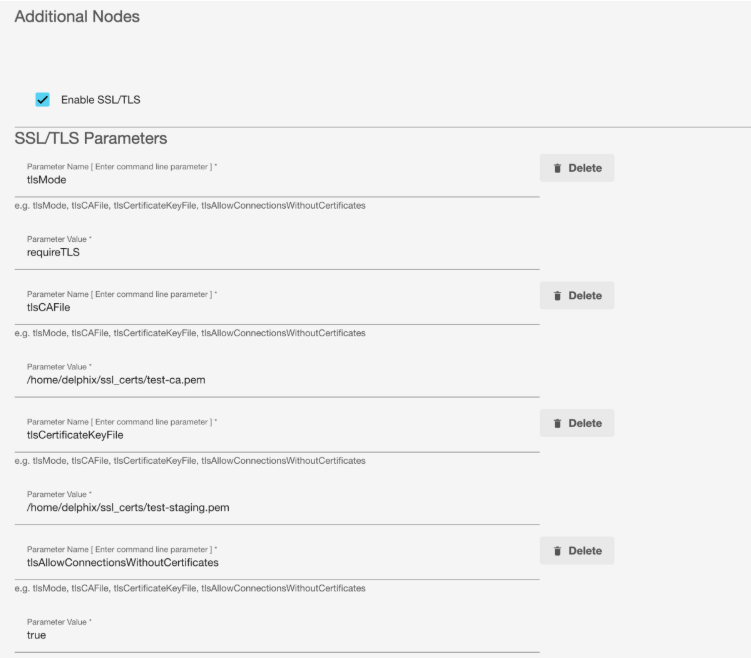
Select the Enable SSL/TLS check box and enter required values.
-
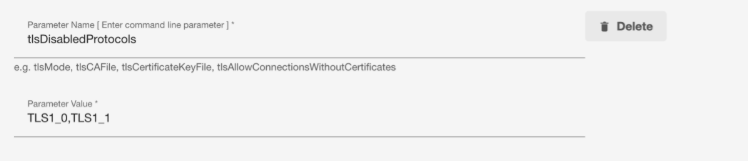
Enter the TLS parameter values.
-
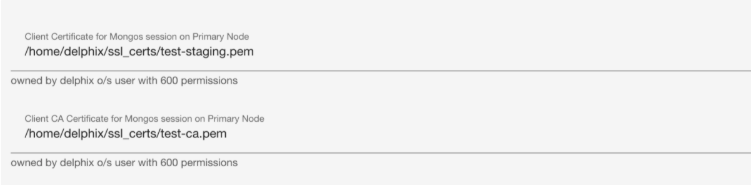
Enter the Client Certificate and Client CA Certificate values for the Mongo session on the Primary Node.
-
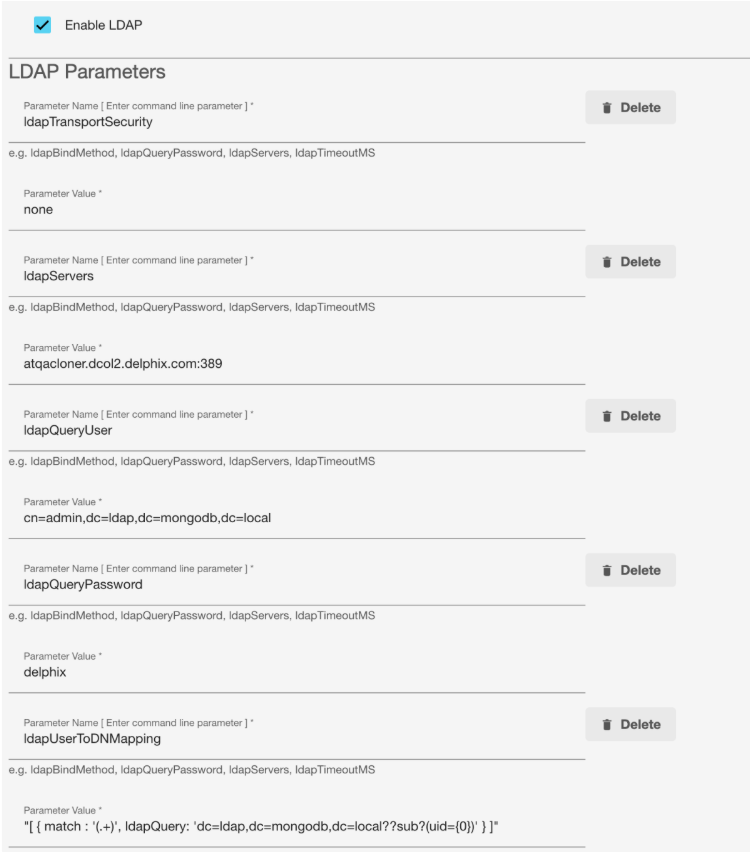
Select the Enable LDAP check box and enter the required values.
-
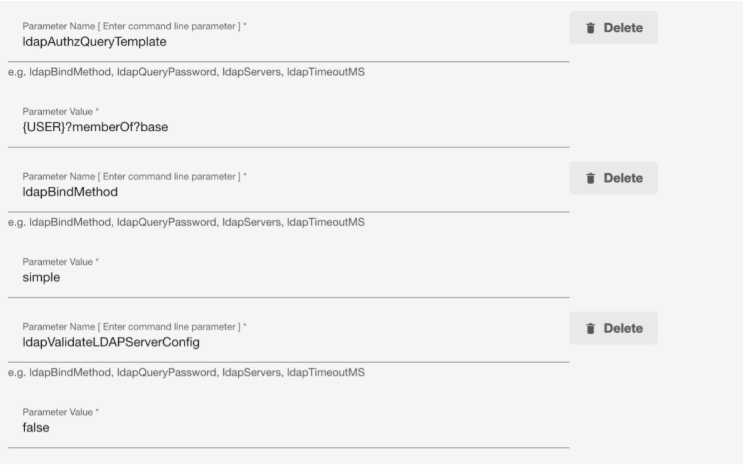
Enter the LDAP Parameter values.
-
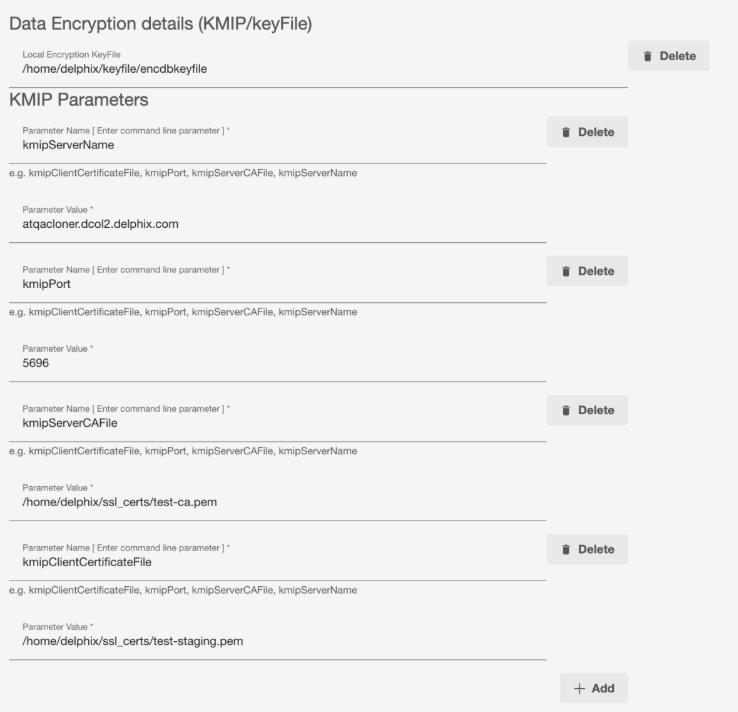
Enter the Data Encryption details.
-
Set ldapTransportSecurity to tls if ldap server expects TLS/SSL communication.
-
If ldapQueryPassword contains special characters, enclose it with single quotes.
-
Click Save.
-
The same parameters will work for operations like Snapshot, Refresh and Delete VDB.