
If a new MSSQL Installation is added to the environment, then in order to reflect it into the Continuous Data UI, it is required to refresh the environment. Please refer to the "Environment Refresh" and “prerequisites” section at Managing environments and hosts for more details.
Add source config
As noted above, environments contain repositories, that are MSSQL Linux installations in the environment. Each environment may have any number of repositories associated with it.
The next step in the virtualization process is to add a SourceConfig. A SourceConfig object defines the configuration of the dSource and is required to create a dSource. You can create any number of SourceConfig objects using a repository, which represents known database instances.
For the MSSQL Linux plugin, Source config must be created manually.
Procedure
Source Config is created on the Staging Environment
-
Login to the Delphix Management application.
-
Click Manage.
-
Select Environments.
-
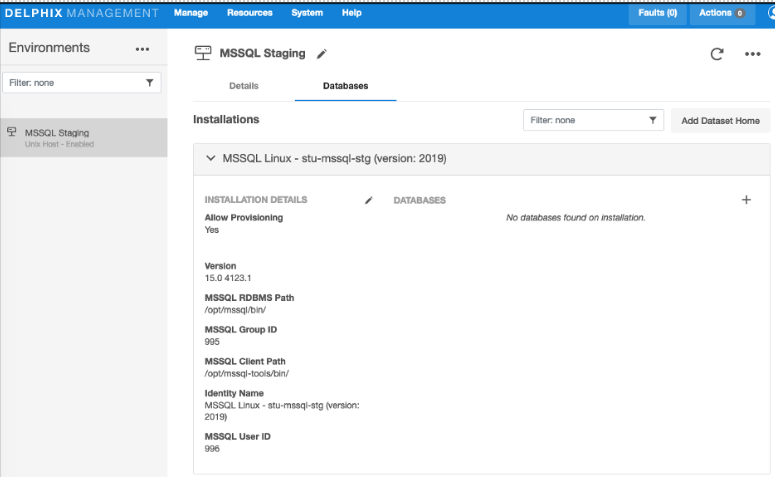
Select the repository.
-
Click on + icon (Shown in next image).
-
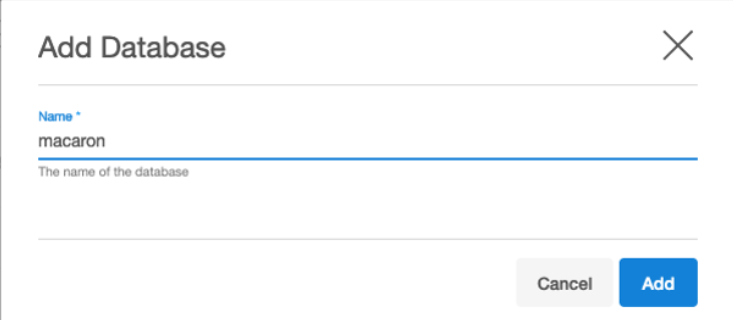
Give the database object a name (same name as the dsource).
-
Click Add.