
Provisioning a TDE hardware security module (HSM)-enabled virtual pluggable database (vPDB) to a TDE HSM-enabled target container requires specifying several TDE provisioning parameters using DCT UI. Additionally, vPDB parameters, such as the vPDB name, target container, and the snapshot to provision from, must be provided. A TDE HSM-enabled vPDB can be provisioned to either a Linked CDB or a vCDB.
For more information, read Oracle documentation and Provisioning TDE HSM-enabled vPDB pages.
Provision a TDE HSM-enabled vPDB to an existing or linked CDB
To provision a TDE HSM-enabled vPDB in DCT, follow these steps:
-
Log in to the DCT instance.
-
Navigate to Data > VDB and click Provision VDB. For more information, read the Provisioning a VDB page.
-
Select the Oracle dSource under the dSources tab to provision and click Next.
-
On the Provision Point page, choose any of the following options:
-
Select Provision Point: Select the provision point displayed on this page.
-
Select Exact Time (Slower): Choose the exact date and time using the calendar.
-
SCN Number Refresh (Slower): Enter the Oracle system change (SCN) number range.
-
Bookmarks: Choose the bookmark from the list.
-
Click Next.
-
-
Select target environment and repository and click Next.
-
On the Target Configuration page, select the HSM option under the TDE Keystore Config Type and enter the TDE Encryption Secret field value and click Next.
-
On the Policies page, select the default DCT Snapshot and DCT Retention policies and click Next.
-
(Optional) On the Masking page, select the Mask this VDB check box and click Next.
-
(Optional) On the Hooks page, configure provisioning hooks and click Next. For more information, read the Hook operations list and Oracle Hook operations page.
-
Review the VDB summary details and click Submit.
Provision a HSM-enabled vPDB to a new CDB
To provision a HSM-enabled VDB to a new CDB in DCT, follow these steps:
-
Log in to the DCT instance.
-
Navigate to Data > VDB and click Provision VDB.
-
Select the Oracle dSource under the dSources tab to provision and click Next.
-
On the Provision Point page, choose any of the provision point option and click Next.
-
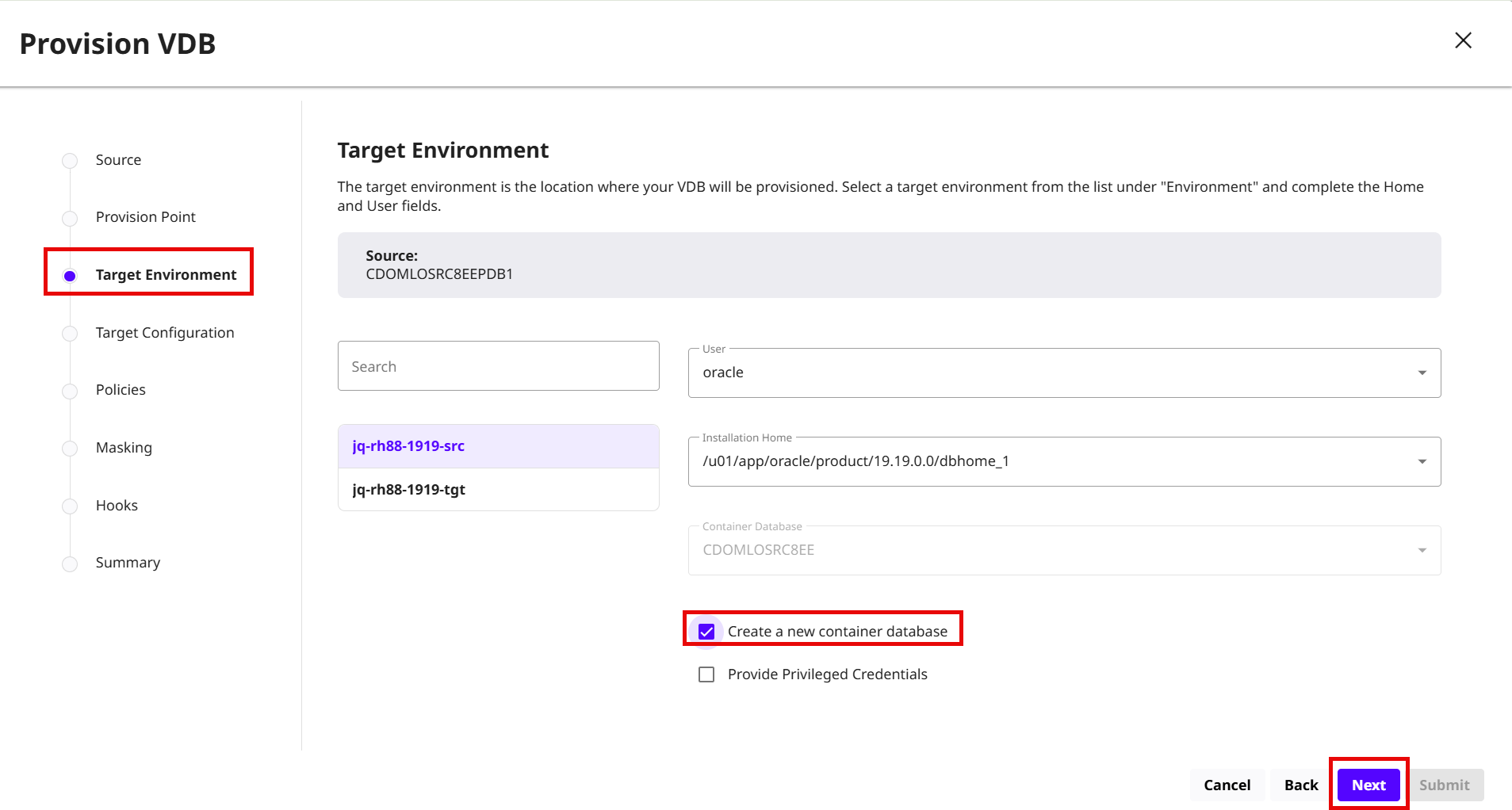
On the Target Environment page, select the Create a new container database check box and click Next.
-
On the Target Configuration page, select the HSM option and under the TDE Keystore Config Type, enter the Target vCDB Autologin Wallet Location,TDE External Key Manager Credential and TDE Encryption Secret field values and click Next.
-
Follow the instructions from step # 7 to 10 in the previous section to complete the provisioning of a new CDB.