
The Perform V2P operation on Oracle VDB or a vPDB in-place to ASM feature introduced in Delphix 9.0.0.0, to allow the V2P operation or in-place conversion of a virtual database to ASM, but the refresh or rewind operation was not allowed aafter the V2P operation was performed on the virtual database.
Starting with the 12.0.0.0 release, Delphix allows a refresh or rewind operation to be performed on a virtual database (VDB or vPDB) after the V2P operation is completed on it.
Allow refresh or rewind a virtual database after V2P to ASM
A new parameter allowRefreshRewindPostV2P has been introduced under operationsPostV2P to allow refresh/rewind on the virtual database after a V2P operation to ASM initiated from it is completed.
ip-10-110-247-210 database export *> ls
Properties
    type: OracleDBExportParameters (*)
    storageStrategy:
        type: OracleExportASMStorageStrategy (*)
        asmLayout:
            type: OracleASMLayout (*)
            defaultDataDiskgroup: +DATA (*)
            redoDiskgroup: (unset)
    transferStrategy:
        type: OracleExportDBInPlaceTransferStrategy (*)
        dbUniqueName: (unset)
        operationsPostV2P: (unset)
        rmanChannels: 8 (*)
        rmanFileSectionSizeInGb: 0 (*)
        virtualSource: VDBOMSRASF1B4_25I (*)
To allow the refresh or rewind operation on the virtual database after the V2P operation, set the parameter allowRefreshRewindPostV2P under operationsPostV2P as true.
On CLI, run the following command to set the same.
set transferStrategy.operationsPostV2P.allowRefreshRewindPostV2P=trueip-10-110-247-210 database export *> ls
Properties
type: OracleDBExportParameters (*)
storageStrategy:
type: OracleExportASMStorageStrategy (*)
asmLayout:
type: OracleASMLayout (*)
defaultDataDiskgroup: +DATA (*)
redoDiskgroup: (unset)
transferStrategy:
type: OracleExportDBInPlaceTransferStrategy (*)
dbUniqueName: (unset)
operationsPostV2P:
type: OracleExportOperationsPostV2P (*)
allowRefreshRewindPostV2P: true (*)
rmanChannels: 8 (*)
rmanFileSectionSizeInGb: 0 (*)
virtualSource: VDBOMSRASF1B4_25I (*)After the V2P operation, a physical database will be running on Oracle Host.
Refresh or rewind a virtual database after the V2P operation
On refresh or rewind operation, the user will get an exception.
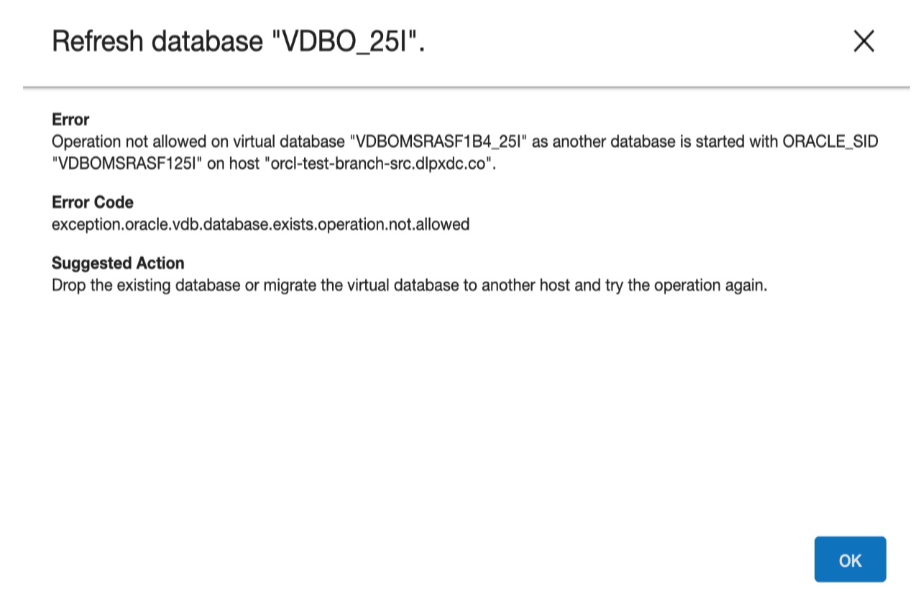
The refresh or rewind operation is not allowed because there is another database running on the Oracle host with the same SID. To go ahead with the refresh or rewind operation, shut down the physical database and then try doing the refresh operation again. The refresh or rewind operation will be successful now.
Set allowRefreshRewindPostV2P using source update operation
After the V2P operation, the Delphix source update API does not allow updating the parameters for a virtual database that has been disabled after the V2P operation. The only exception is the allowRefreshRewindPostV2P parameter, which can be set as shown below:
ip-10-110-247-210> source
ip-10-110-247-210 source> select VDBOMSRASF1B4_5JK
ip-10-110-247-210 source 'VDBOMSRASF1B4_5JK'> update
ip-10-110-247-210 source 'VDBOMSRASF1B4_5JK' update *> set allowRefreshRewindPostV2P=true
ip-10-110-247-210 source 'VDBOMSRASF1B4_5JK' update *> commit;
    Dispatched job JOB-116
    SOURCE_UPDATE job started for "VDBOMSRASF1B4_5JK".
    SOURCE_UPDATE job for "VDBOMSRASF1B4_5JK" completed successfully.
An attempt to update any other virtual database parameter will fail with the following error:
ip-10-110-247-210 source 'VDBOMSRASF1B4_5JK' update *> set allowAutoVDBRestartOnHostReboot=true;
ip-10-110-247-210 source 'VDBOMSRASF1B4_5JK' update *> commit;
    Dispatched job JOB-117
    SOURCE_UPDATE job started for "VDBOMSRASF1B4_5JK".
    This operation is not allowed on source 'ORACLE_VIRTUAL_SOURCE-9' with name 'VDBOMSRASF1B4_5JK' as the source is disabled after a successful V2P job.
  Action: To re-enable, migrate this virtual source to a different host or a different CDB (if it is a virtual pluggable database) first and then rewind to the latest snapshot. Delete the virtual source if it is no longer needed. This does not impact the newly created physical database.
ip-10-110-247-210 source 'VDBOMSRASF1B4_5JK'>
After setting the parameter allowRefreshRewindPostV2P to true, the refresh or rewind operation will be successful from GUI.