
This ingestion method uses an external backup plus WAL (Write-Ahead Logging) application between the source and staging databases. The architecture is shown below.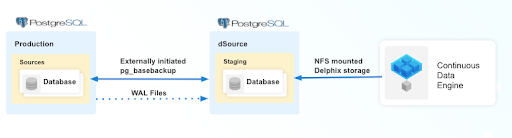
Use the following procedure to create a dSource with an external backup that uses WAL logs to stay in sync with the source.
Prerequisites
Ensure that you meet the following requirements before you begin creating a dSource.
-
The environment requirements are met by the source and staging environments as described in the Requirements for PostgreSQL Staging/Target environment.
-
The environment user or the privileged-user must have the following permissions:
-
Access to the PostgreSQL commands
-
Read+write+execute permissions on the `unix_socket_directories` configured in `postgresql.conf` file (The default directories are `/var/run/postgresql` & `/tmp`).
-
-
To use privilege elevation
-
You must meet the Privilege Elevation Requirements.
-
The high privilege user must have the following permissions:
-
Read+execute permissions on the PostgreSQL Backup File Path
-
Read permission on the backup file(s)
-
Read+write+execute permissions on the PostgreSQL Backup WAL Log Files Path.
-
Read permission on the WAL logs within WAL Log Files Path.
-
-
Providing the pg_basebackup full backup
In connector versions 3.2.0 and greater, the pg_basebackup database full backup can be provided in three ways, ranked in the order of high-to-low precedence:
-
Backup in an organized folder structure (highest precedence). The backup files are placed within organized folders inside the PostgreSQL Backup File Path, each folder named PostgreSQL_T<YYYYMMDDhhmmss>. During dSource creation or resync, the backup from the folder with the latest timestamp is selected automatically. The backup files inside the folder must not be zipped.
-
Create the backup folder on the staging server:
DLPXPGBACKUPDIR=PostgreSQL_T$(date "+%Y%m%d%H%M%S") mkdir -p <backup_path>/$DLPXPGBACKUPDIR -
Run the following command to take the source backup on the staging server using pg_basebackup:
For PostgreSQL versions 9.4.x,9.5.x,9.6.x:
<path_to_bin>/pg_basebackup -D <backup_path>/$DLPXPGBACKUPDIR -F t -v -w -P -x -h <source_ip_domain_name> -p <source_port> -U <source_user>For PostgreSQL versions 10.x and above
<path_to_bin>/pg_basebackup -D <backup_path>/$DLPXPGBACKUPDIR -F t -v -w -P -Xs -h <source_ip_domain_name> -p <source_port> -U <source_user>
-
-
Backup stored directly in the Backup Path. The backup files are stored directly inside the PostgreSQL Backup File Path (for example, /var/tmp/backup). Always redirect the pg_basebackup output to an empty directory first, and then move it to <backup_path>.
-
For PostgreSQL versions 9.4.x,9.5.x,9.6.x:
<path_to_bin>/pg_basebackup -D <path_to_empty_directory> -F t -v -w -P -x -h <source_ip_domain_name> -p <source_port> -U <source_user> -
For PostgreSQL versions 10.x and above
<path_to_bin>/pg_basebackup -D <path_to_empty_directory> -F t -v -w -P -Xs -h <source_ip_domain_name> -p <source_port> -U <source_user> -
Move the files to the backup path:
mv <path_to_empty_directory>/* <backup_path> -
Backup as a ZIP file (lowest precedence). The backup files are compressed into a single ZIP file named PostgreSQL_T<YYYYMMDD>.zip and placed directly inside the PostgreSQL Backup File Path. The backup files must be at the root level of the ZIP file (not in subfolders), and the archive must not be double-zipped.
-
Take the source backup on the source server using pg_basebackup:
-
For PostgreSQL versions 9.4.x,9.5.x,9.6.x
<path_to_bin>/pg_basebackup -D <destination_path> -F t -v -w -P -x -
For PostgreSQL versions 10.x and above
<path_to_bin>/pg_basebackup -D <destination_path> -F t -v -w -P -Xs
-
-
Create a ZIP file that can be moved to the staging server (with backup files at the root of the archive):
cd <destination_path>
# The backup files should be at the root of the ZIP file
DLPXPGBACKUPZIP=PostgreSQL_T$(date +"%Y%m%d").zip
zip $DLPXPGBACKUPZIP *
-
For more information, refer to Requirements and Prerequisites.
Limitation
For PostgreSQL versions 9.4 and 9.5, the connector creates the staging instance as a warm standby. This instance is not accessible because it is always in recovery mode and does not allow any connection. The limitation does not affect the provisioning of a VDB.
Procedure
After you add an environment and create a source configuration, continue with the following method-specific steps in the Create and Link dSource wizard.
-
On the Source tab, do the following:
-
In the NFS Mount Location field, provide a mount location on the staging environment.
-
If you want to use Privilege Elevation, provide the username of the Privileged OS Account. Once the dSource is created, you will not be able to update the privileged OS account. Recreating the dSource account is the only way to make changes.
-
-
Click on the +Add icon next to External Backup Parameter. Click the +Add button for External Backup only once. The solution supports a single backup path; providing multiple paths will cause an error during linking.
-
Specify the PostgreSQL Backup File Path. This is the location of the backup file.
-
Specify the PostgreSQL Backup WAL Log Files Path. This is the location of the WAL log files.
Once the dSource is set up using a full external backup from the staging environment, it operates in recovery mode and waits for the next expected WAL file in the specified PostgreSQL Backup WAL Log Files Path. When the expected WAL files are placed in this path, the dSource applies them and waits for the next expected files in sequence. If an invalid or out-of-sequence WAL file is provided, the dSource throws an error on the UI when the next dSource snapshot is taken. To recover from an error in the WAL chain, either resynchronize the dSource or provide the missing WAL file. After addressing the issue, you may need to disable and then re-enable the dSource database.
-
Specify the Staging Instance Port Number. This number must be unique for a given instance.
-
Optionally, define database configuration parameters during the linking operation in the Config Settings section. During dSource creation, you can configure parameters and their values in the postgresql.conf file using the Config Settings section. For example, to disable SSL, specify the ssl parameter and its value — this updates the existing parameter value in postgresql.conf. To disable a parameter, specify the parameter name and select the Comment Property check box; this comments out the parameter in the configuration file.
-
Click Next.
-
Provide a dSource name and select a group for your dSource. Adding a dSource to a dataset group allows you to manage user permissions for that database and its objects, including snapshots. For more information, refer to the topics under Users and Groups.
-
Specify your staging environment, user, and snapshot parameters. Select the Resynchronize dSource checkbox if you want to resynchronize the dSource. This operation will force a non-incremental load of data from the source. This operation is similar to creating a new dSource, but prevents duplication of the storage requirements and maintains timeflow history. Click Next to proceed.
-
Apply policy details to the dSource if needed, then click Next.
-
Select a Hook Point and then click + to add a script that you want to run at that hook point. You can define scripts to run at multiple hook points.
-
Review the configuration profile for your dSource and click Submit.
-
The Delphix Continuous Data Engine will initiate two jobs, namely DB_Link and DB_Sync to create the dSource.
-
Monitor the jobs by selecting Admin > Operations in the top menu bar. On successful completion of the DB_Link job, the database icon changes to a dSource icon under Data > Data Management > dSources.
The dataset must not be disabled after failed or canceled RESYNC job. For more information, read the Best practices for the RESYNC job topic.
After the dSource is created successfully, open the dSource Configuration tab to view details and make modifications to policies and permissions. In the Datasets panel, select the specific dSource and navigate to the Configuration tab to view source files, data management configuration, and hook operations.