
Linking a dSource ingests SAP HANA data into Delphix-managed storage. Perform this task when preparing data for snapshotting and virtualization.
Prerequisites
- If the source database uses LSS with encryption, place the root key backup file (
.rkb) on the staging host and note the file path.
High-level steps
- Navigate to Data > Data Management > dSources.
- Select + dSource in the top-right corner.
- Select Source-based dSource.
- Choose a source configuration.
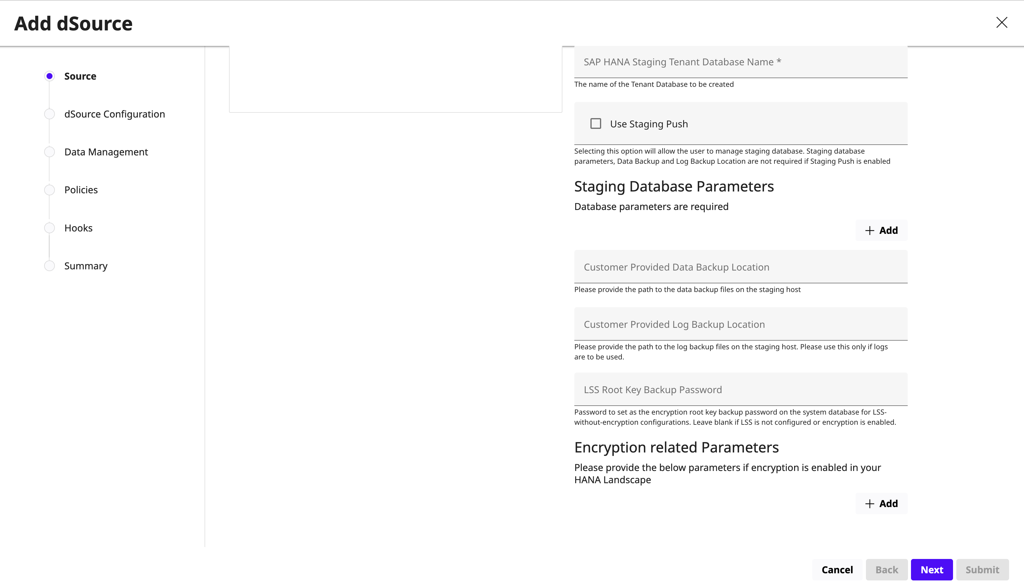
- Provide staging and database parameters.
-
Example of the SAP HANA dSource configuration flow:
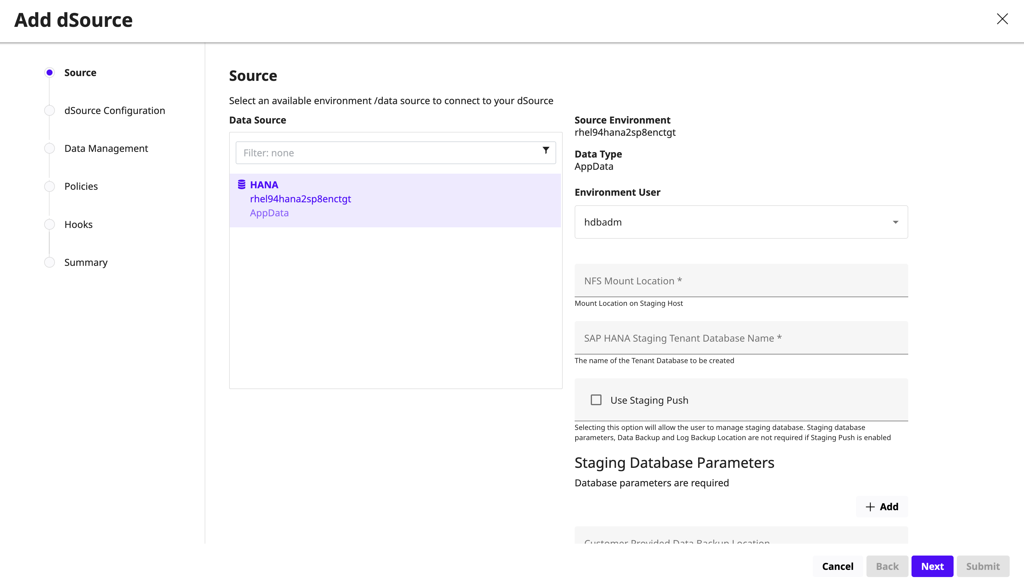
- For External Backup (Staging Pull) with LSS-based databases with encryption off, enter the LSS Root Key Backup Password value. For External Backup (Staging Pull) with LSS-based databases with encryption on, enter all the values in Encryption Parameters.
-
Example of backup and encryption parameter fields in the dSource wizard:
- Define dSource metadata.
- Configure data management and policies.
- (Optional) Add hooks.
- Review the summary and submit.
Result
The dSource appears as Inactive during linking and transitions to Active after completion.
What’s next
Last updated
Oct 9, 2026