This section covers the requirements for a SQL Server Windows failover cluster target environment.
Common requirements for failover cluster target environments
The following common requirements exist for Windows Failover Clusters with SQL Server Always-On Failover Cluster Instances or Always-On Availability groups to be added as Target Cluster Environments, to be used for VDB Provisioning.
-
You must first add each node in the Window Failover Cluster individually as a standalone target environment, using a non-clustered address. For more information, read the Adding a SQL Server Standalone Target Environment topic.
-
The Delphix Engine may show a warning that it cannot discover the Failover Cluster Instances or Availability groups on each standalone host. This is expected.
-
-
Each node in the cluster must have the Failover Cluster Module for Windows PowerShell feature installed.
-
While running Windows PowerShell as an administrator, enter this command to test that the module is available:
Import-Module FailoverClusters
-
-
An additional target environment that can be used as a Connector Environment must exist. For more information, read the Staging Host Requirements section.
-
This environment must not be a node in the cluster.
-
This environment should be part of the same Active Directory domain as the cluster.
-
- In addition to the connectivity provided by this template:
- The Staging Server must be able to connect to the Cluster IP Address using the RPC / Remote Registry port TCP 445.
Connectivity to the Cluster IP Address can be tested using the following PowerShell command. This command should be run from the Staging Server, and specify the Cluster Hostname:
New-Object System.Net.Sockets.TcpClient("aodns-fc.mydomain.local", "445")
Requirements for Windows failover cluster target environments
When adding a Windows failover cluster as target environments with either SQL Server Failover Cluster Instance or Always On Availability Group, all nodes of the cluster must meet the requirements described in this document.
-
When discovering or refreshing Failover Cluster instance or Always On Availability Group environments:
-
The Staging Server must be able to connect to the Cluster IP Address using the RPC / Remote Registry port TCP 445.
-
-
Connectivity to the Cluster IP Address can be tested using the following PowerShell command. This command should be run from the Staging Server, and specify the Cluster Hostname:
New-Object System.Net.Sockets.TcpClient("aodns-fc.mydomain.local", "445")
Requirements for failover cluster target environments with SQL Server FCI
The following additional requirements exist for Windows Failover Cluster with SQL Server Always-On Failover Cluster Instances added as Target Environments, to be used for VDB Provisioning.
-
Each clustered SQL Server instance must have at least one clustered disk added to the clustered instance resource group, which can be used for creating mount points to Delphix storage.
-
The clustered drive must have a drive letter assigned to it.
-
The clustered drive must be formatted using the "GUID Partition Table (GPT)" partition style, for the Delphix Engine to automatically discover the drive letter as a valid option for the cluster instance. An MBR-formatted disk requires manual verification outside of Delphix that the disk has been correctly added to the MSSQL clustered resource group before creating the VDB. When provisioning the VDB, you must manually specify the desired MBR disk, because it will not appear in the Delphix GUI.
-
The clustered drive must be added to the clustered instance resource group as a dependency in the Failover Cluster Manager.
-
Requirements for failover cluster target environments with SQL Server Availability groups added as target environments
The following additional requirements exist for SQL Server Always-On Availability groups added as Target Environments, to be used for VDB Provisioning.
-
The Always-On Availability group feature must be enabled on every cluster node instance, which is participating in the Availability group. To enable this feature, refer to the Microsoft SQL Server documentation for steps.
AG listeners are required to enable masking on the AG VDBs. The availability group to be added as a target cluster environment must configure a listener with a TCP Port, such as the SQL Server default 1433, if masking is enabled for the AG VDBs. -
Make sure that no Availability Group replica is hosted on a failover cluster instance.
Additional requirements for Azure SQL server availability groups
Microsoft's tutorial and deployment template for building a SQL Server AlwaysOn Cluster in Azure does not include the full range of network connectivity that is available in on-premise deployments.
To allow this connectivity on the marketplace template, the following additional steps may be required:
-
On a node of the SQL Server cluster, use PowerShell to define a probe port. The active cluster node will open this port so that the Azure Load Balancer can detect it.
Get-ClusterResource "Cluster IP Address" | Set-ClusterParameter -Name "ProbePort" -Value 59998.The value 59998 is an example probe port. This value can be changed if needed and port numbers can be in the range 59990–59999, but higher unused ports can also be used.
The value Cluster IP Address refers to the name of the IP Address resource in the Windows Server Failover Cluster (WSFC). This is commonly the default name, but it can vary based on how the cluster was configured. To identify the correct resource name, please follow the screenshot included below:
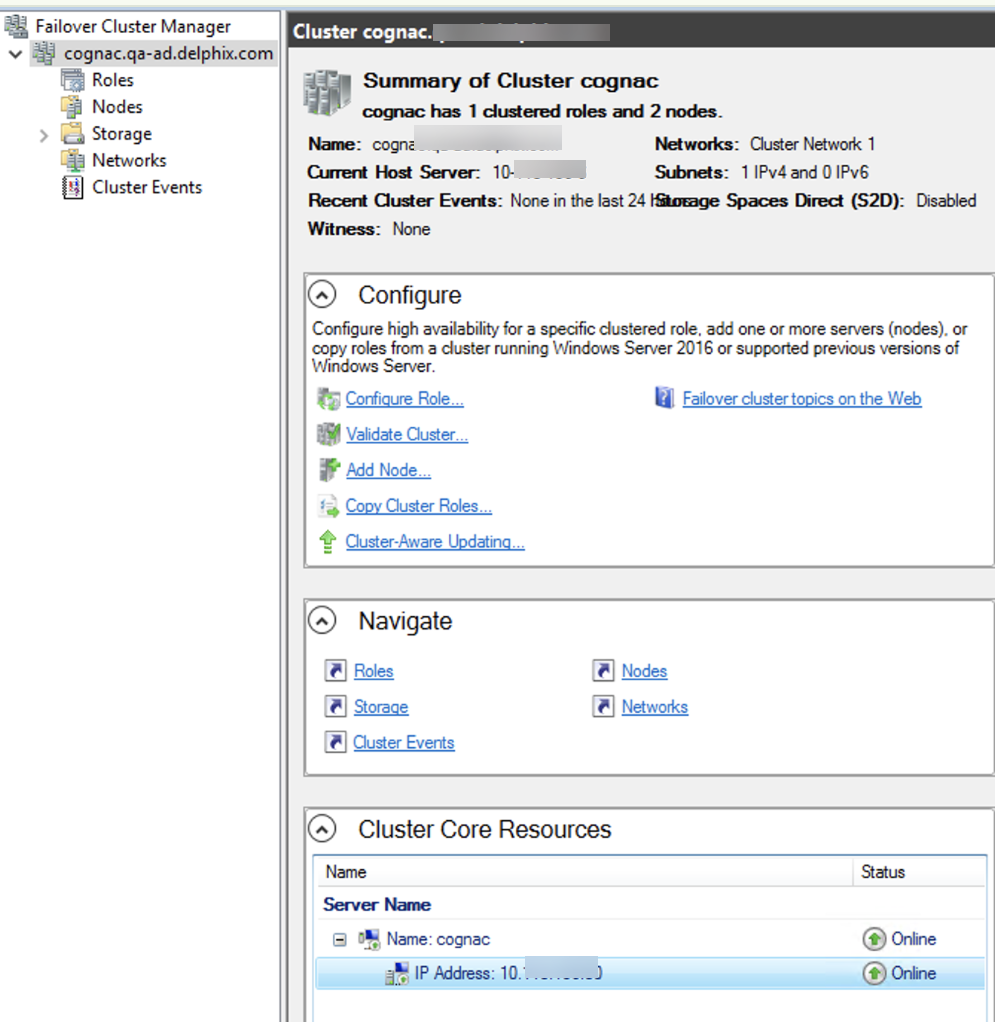
Select the IP Address from the Cluster Core Resources and right click it and select the Properties option to view the name for the IP Address as shown below, which in this example is currently named Cluster IP Address:
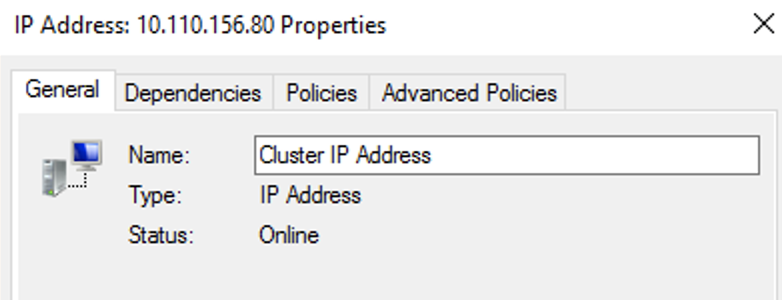
A cluster admin name can be the IP Address resource with any desired name, such as "IP Address 10.43.23.43".
-
From the Failover Cluster Manager, ensure that the Core Cluster Resource has a valid IP address for its subnet (this may be configured with an invalid IP address such as 169.254.1.1).
-
On all nodes of the SQL Server cluster, ensure that the Windows Firewall allows inbound TCP traffic on TCP port 59998.
-
Extend the Azure Load Balancer (sqlLoadBalancer) configuration to route connections to the Cluster IP Address.
-
Add a Frontend IP Address for the Cluster IP Address, with an IP address matching that configured for the cluster.
-
Add a Health Probe for TCP port 59998.
-
Add a Load Balancing Rule for Port 445, using the newly created Frontend IP Address and Health Probe.More complicated Azure AlwaysOn deployments, such as those including multiple networks, may require additional steps to allow this connectivity.
-
-
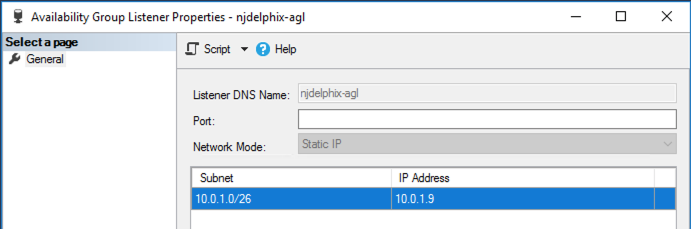
The default Availability Group Listener is not configured with a TCP Port. Current versions of Delphix require this to be configured with a valid port number, such as the default port 1433. This can be changed via the AlwaysOn object tree in SQL Server Management Studio: