
Upgrading from earlier versions must be performed in a step-by-step sequence for each major release. For example, upgrade from version 5.0 to version 6.0 before upgrading to version 7.0. Refer to the official MongoDB upgrade documentation.
Upgrade process
Perform the following steps when upgrading your MongoDB version.
-
On Staging and Target environments
As a best practice, take a snapshot of VDBs before upgrade. For in-place upgrade, we don’t need to update themongorepos.txtfile.-
Install newer MongoDB version on the Staging and Target Environments.
Specify location of new MongoDB version.
$ cat .mongorepos.txt
MONGO_PATH=/u01/mongo509/bin/mongod
MONGO_PATH=/u01/mongo6017/bin/mongod
-
-
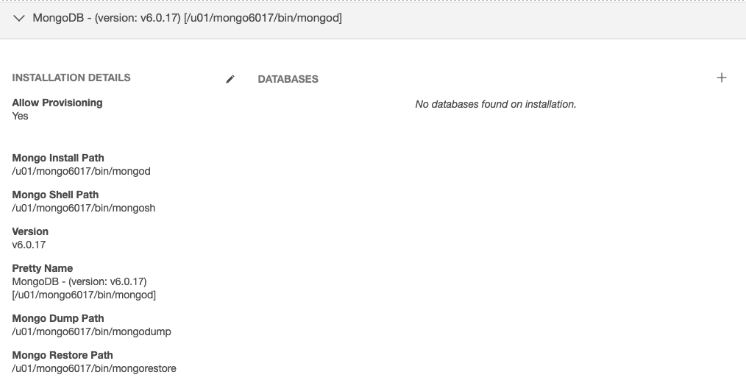
Refresh Staging and Target environments to make sure the newly installed MongoDB repository is discovered.
For in-place upgrade, once you refresh, Delphix Engine will create a new repository for the updated MongoDB version and existing dSources and VDBs would still point to the old one. Hence, user has manually associate to the newer repository. To do so, please follow Step 2 and Step 3 as listed below.
-
Disable and shutdown VDB and dSource.
-
Migrate dSource to newer repository.
- Login to Delphix Engine CLI.
$ ssh admin@dlpx-21000-mkk.dcol2.delphix.com (admin@dlpx-21000-mkk.dcol2.delphix.com) Password:: dlpx-21000-mkk.dcol2> - Make sure newly added MongoDB version is displayed in the repositories.
dlpx-21000-mkk.dcol2> repository


							dlpx-21000-mkk.dcol2 repository> ls
							Objects
							NAME                                                        VERSION  ENVIRONMENT
'MongoDB - (version: v6.0.17) [/u01/mongo6017/bin/mongod]' - mkk-prod-src - Go to the
sourceconfigand update the repository of the given dSource.dlpx-21000-mkk.dcol2 sourceconfig>
select offline_mongodb
dlpx-21000-mkk.dcol2 sourceconfig 'offline_mongodb'> update
dlpx-21000-mkk.dcol2 sourceconfig 'offline_mongodb'
update *> set repository="'MongoDB - (version: v6.0.17) [/u01/mongo6017/bin/mongod]'"
dlpx-21000-mkk.dcol2 sourceconfig 'offline_mongodb' update *> commit
Dispatched job JOB-44
SOURCE_CONFIG_UPDATE job started for "offline_mongodb".
SOURCE_CONFIG_UPDATE job for "offline_mongodb" completed successfully. - Make sure the repository has been successfully updated for the given
sourceconfig.dlpx-21000-mkk.dcol2 sourceconfig 'offline_mongodb'> ls
Properties
type: AppDataStagedSourceConfig
name: offline_mongodb
discovered: false
environmentUser: delphix
linkingEnabled: true
parameters:
pretty_name: offline_mongodb
reference: APPDATA_STAGED_SOURCE_CONFIG-1
repository: 'MongoDB - (version: v6.0.17) [/u01/mongo6017/bin/mongod]'
toolkit: sc:mongopy - Go to Delphix Engine UI, enable dSource and take a new snapshot
- Login to Delphix Engine CLI.
-
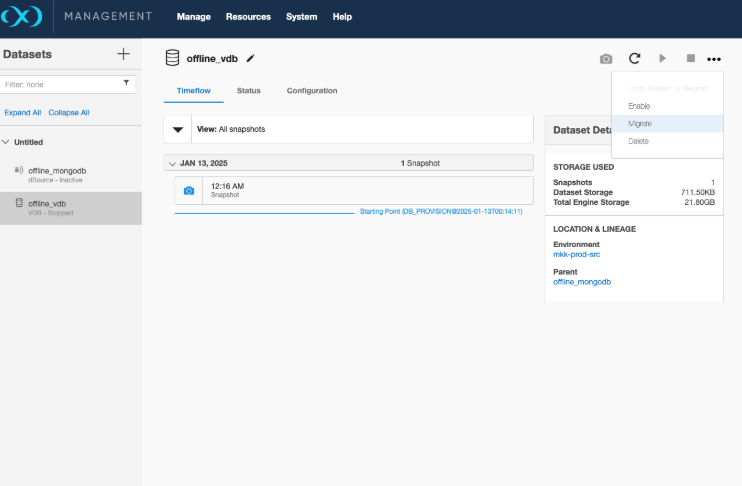
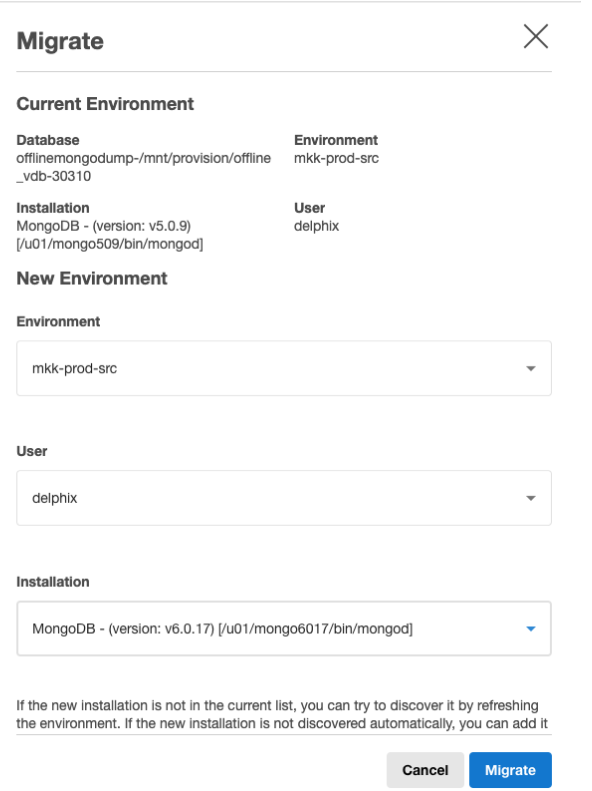
Migrate VDB to newer repository.
-
Enable the VDB and take a new snapshot.