
Ensure that completed YBA controller backups (YBC backups) are available in AWS S3 or Azure Blob Storage before proceeding. Delphix restores the most recent completed full backup and the most recent completed incremental backup found in the Backup Location.
Configure the Azure Backup Provider
-
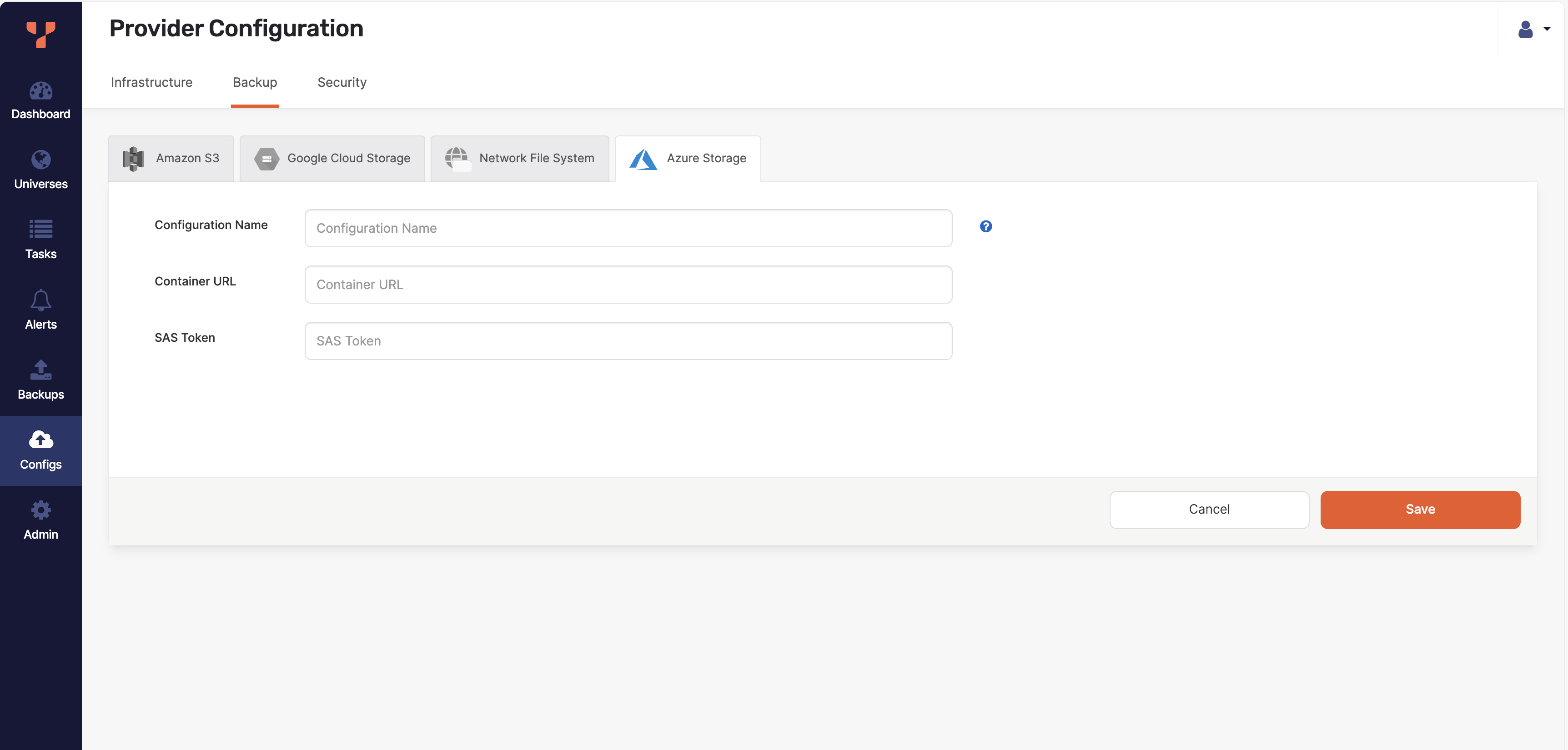
In the YBA UI, navigate to Configs → Backup → Azure Storage.
-
Click Create AZ Backup.
-
In the form that appears, provide:
-
Configuration Name
-
Container URL
-
SAS Token
-
Click Save to register the storage configuration.
Configure the AWS S3 backup provider
-
In the YBA UI, navigate to Configs > Backup > Amazon S3.
-
Click Create S3 Backup.
-
Enter a configuration name and bucket. Authenticate with AWS access keys or select Use IAM Roles.
Create a scheduled backup policy
-
In YBA, open the universe and go to Backups > Scheduled Backup Policies > Create Scheduled Backup Policy.
-
Select the YSQL database or databases to back up and choose Standard backup without point-in-time restore support.
-
Choose the backup storage configuration for AWS S3 or Azure Blob Storage.
-
Set the full backup interval. Enable Take incremental backups within full backup intervals and set an incremental interval shorter than the full backup interval.
-
Set the backup retention period so the full backup and its incremental backups remain available until dSource synchronization completes.
For more information, see Schedule universe backups.
Set Backup Location to the universe folder, not an individual backup folder. For example, use s3://<bucket>/univ-<id> or https://<account>.blob.core.windows.net/<container>/univ-<id>. All databases listed in Database Names must be present in each completed backup.
Alternative Method: Backup Using Yugabyte Anywhere (YBA) API
You can also take a backup using the Yugabyte Anywhere (YBA) API.
Below is a sample API and payload:
API:
https://{platform_address}/api/v1/customers/{customer_uuid}/backups
Payload:
{ "backupCategory": "YB_CONTROLLER", "backupType": "PGSQL_TABLE_TYPE", "storageConfigUUID": "storageConfigUUID", "universeUUID": "universeUUID" } Parameters:
-
platform_address: The hostname/IP address of Yugabyte Anywhere.
-
customer_uuid: The customer UUID specified in YBA.
-
storageConfigUUID: The UUID of the storage configuration.
-
universeUUID: The UUID of the universe.