
Introduction
The License Usage report provides visibility into current platform license usages, historical source sizes, and detailed breakdowns of data consumption across the Delphix platform. This report is recommended when having usage and entitlement discussions with your Delphix Account Team and internal organization. This information is shared as part of Delphix Telemetry.
To understand how source sizes are calculated, refer to the Usage-based measurements knowledge article.
Delphix Telemetry is required to enable this report. Review the Registration and Telemetry page to get started.
Size considerations
If a data source is only being profiled or masked and not virtualized, traditional sizing methods are used. If a source is both virtualized and masked, the virtualization calculation method is used.
Supported databases using traditional sizing:
-
Oracle (Continuous Compliance 2025.3+ required)
-
SQL Server (Continuous Compliance 2025.3+ required)
-
SAP ASE (Continuous Compliance 2025.6+ required)
-
PostgreSQL (Continuous Compliance 2025.4+ required)
-
Other: Compliance-only sizing is not supported. However, if the profiled or masked source is also virtualized, then the virtualization calculation method is used.
Overview tab
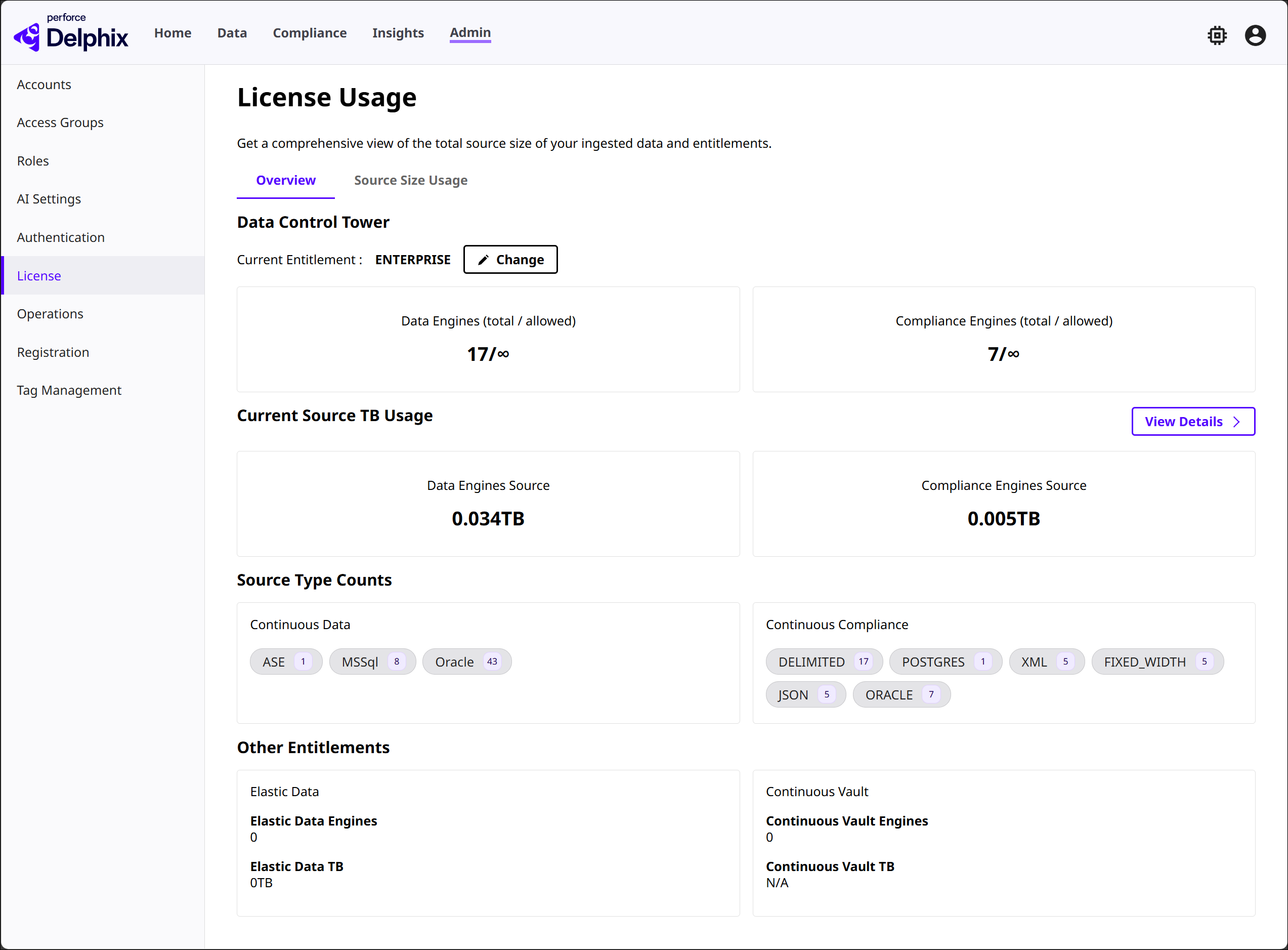
This section summarizes the overall, current license usage for your environment, providing quick insight into system-wide entitlements and ingestion-based usage.
-
Current Entitlement: Displays the configured DCT tier (Core, Self-Service, or Enterprise)
-
Engines: Shows the total number of Data Engines and Compliance Engines.
-
Current Source TB Usage:
-
The total Continuous Data source sizes in TB
-
The total Continuous Compliance Engine source sizes in TB
-
-
Source Type Counts: Breaks down the number of sources by category, such as Oracle, SQL Server, MongoDB, and AWS RDS. This is important if you utilize a paid Select or Premium Connector.
-
Other Entitlements: Lists additional entitlements enabled in the environment, including:
-
Elastic Data: Shows the Elastic Data engine count and TB usage.
-
Continuous Vault: Shows the Vault engine count and TB usage (coming soon).
-
Hyperscale: Shows the Hyperscale engine count and TB usage (coming soon).
-
Source Size Usage tab
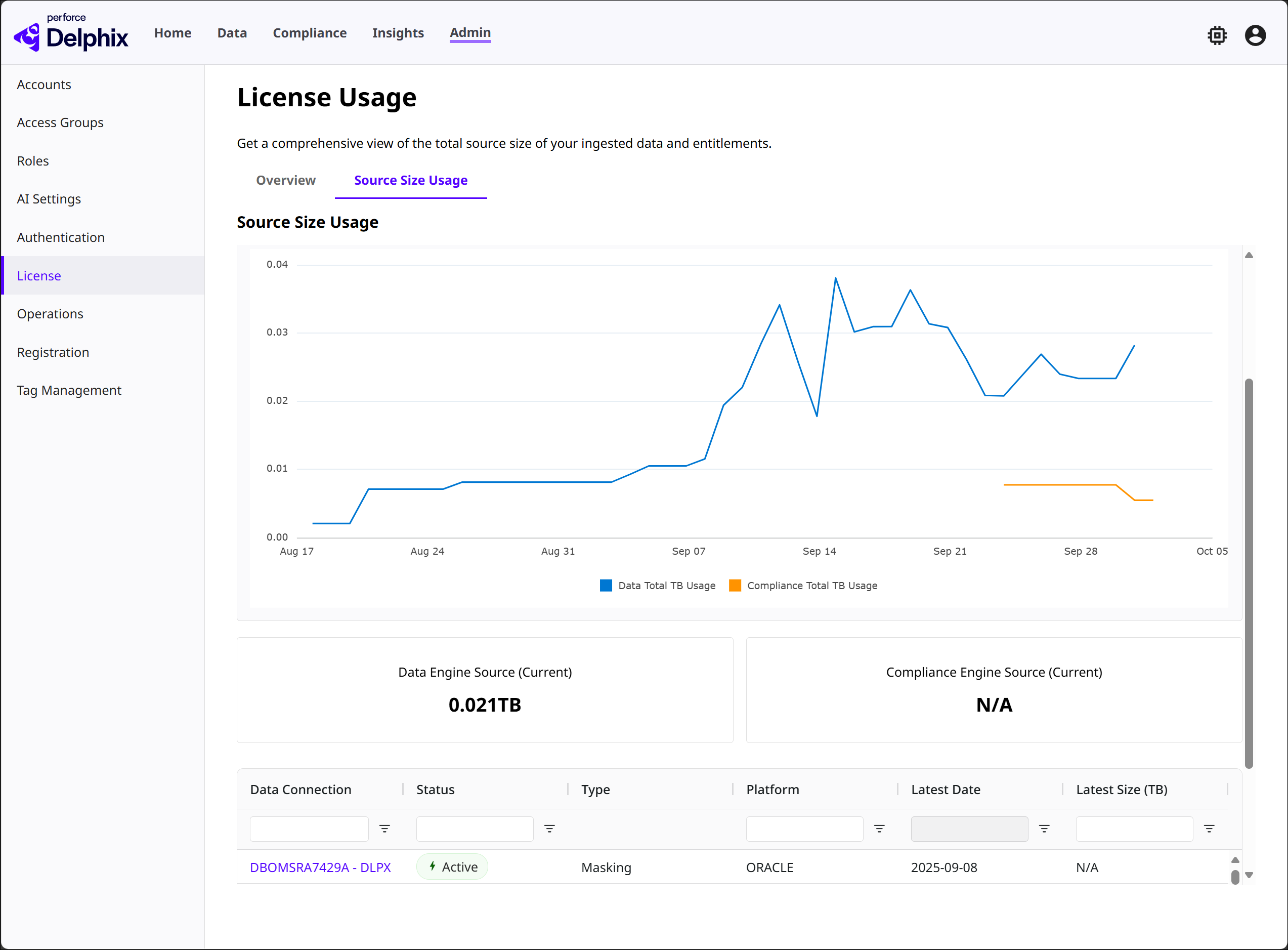
This section offers a granular breakdown of data usage.
-
Source Size Usage chart: Plots TB usage trends over time for Data and Compliance Engines in a graph. The graph can be filtered by date range.
-
Data/Compliance Engine Source (Current): The total source size in TBs for each type. The values shown are based on the last date for the given range.
-
High Water Mark Source: The highest source size in TBs for a given day across the given range.
-
Per-source usage: Shows the details for individual data sources in a table, including:
-
Data Connection name: Using the connection name allows Delphix to de-duplicate sources across dSources and connectors. Select a connection to see what data sources it’s composed of.
-
Status (Active, Deleted, etc.): Only Active status types are included in the sizing. The value will reflect the state of the connection at the selected time range’s ending date.
-
Type (Virtualization, Masking, Elastic, Hyperscale, Vault): Summarizes the usage of any descendant of the root source. For example, if a child VDB is profiled masked, its root dSource connection will be marked as Virtualization and Masking.
-
Platform (Oracle, etc.)
-
Latest Date
-
Largest Size (TB)
-
With more to be added, such as Highest Date/Size, Tags, and dSources.
-
The search bar at the top of the table can be filtered further to identify sizing trends or charge back requirements. The Export button can be used to export the table’s contents as a PDF or CSV.
This information helps administrators monitor growth trends, identify underutilized or missing sources, and track compliance-related usage at the data source level.
Troubleshooting
The backend Data Connection mechanism will try to consolidate duplicate sub-connections (or sources) into a single connection based on the hostname and port. This is what allows DCT to eliminate duplicate calculations across multiple VDB or connectors.
However, because Delphix allows great flexibility to connect to databases, such as Staging Push, we might not be able to accurately consolidate sources and identify the correct lineage in all scenarios.
If you notice any incorrect relationships, they can be corrected by navigating to the Admin > Data Connections section and manually re-assigning sub-connections to the appropriate connection.