
The Full Name algorithm (introduced in Masking Engine version 6.0.8.0) has logic to separate the input into two parts: First and Last names. It can also limit the number of masked names (removing the rest) and “smart trim” the result (masked) output to the required length.
If Name framework algorithm instances are used, the Full Name algorithm can consider particles. The Full Name algorithm uses the Last Name algorithm’s particles when determining which part of the input is the last name. The remainder of the input is considered the first name and the First Name algorithm’s particles apply to that.
After distinguishing the parts of the input string, the Full Name algorithm feeds each word from the first name part (which also includes middle names, treated the same as first names) individually to the First Name algorithm instance, and the whole last name part to the Last Name algorithm instance. Then it combines the masking results, according the embedded logic and the configuration.
full name
If the input string contains only a single word - this word is considered as a first name or last name (depending on the Consider Single Word Input as Last Name flag) and forwarded for masking to the corresponding chained algorithm instance. A single word input is always masked, even if it is a configured particle.
Main features of the Full Name Framework:
-
Deterministic output: The masked result for each input is consistent when using the same algorithm key, same configuration and same chained algorithm instances.
-
Not unique: The masked result might be the same for different inputs.
-
Garbage in garbage out: the algorithm returns the unmasked input / null / empty string if input is one of the following: null, empty string “”, white spaces only “ ”.
-
Single word input: considered either as a Last Name (default) or as a First Name, even if configured in one of the particles files.
-
When particle is configured in both particles files: the remove action takes precedence.
-
Multiple first names: masks only first N names (1-4, as configured, default = 2), the rest are removed. (Note: only one name can be considered the last name; the rest are masked as first names.)
-
Full Name Convention: if a configured last name separator is detected, or the configured convention is “last-first-middle”, then the input is interpreted as last-first-middle. Otherwise, it is first-middle-last (default). Leading/trailing and duplicate white spaces are not preserved.
-
Smart trim: if trimming of the masked value is required, it's done in a way to keep the full name as long and realistic looking as possible. For instance, first we trim the leading/trailing preserved particles. If that’s not enough, we abbreviate the masked first/middle names (one by one, starting with the last one). If that’s still no enough, we remove the particles prior to the last name, etc.
Below is an example of smart trim. Let's suppose our masked result (prior to checking of the maxLength) is:
President George Herbert Walker Van Bush Jr.
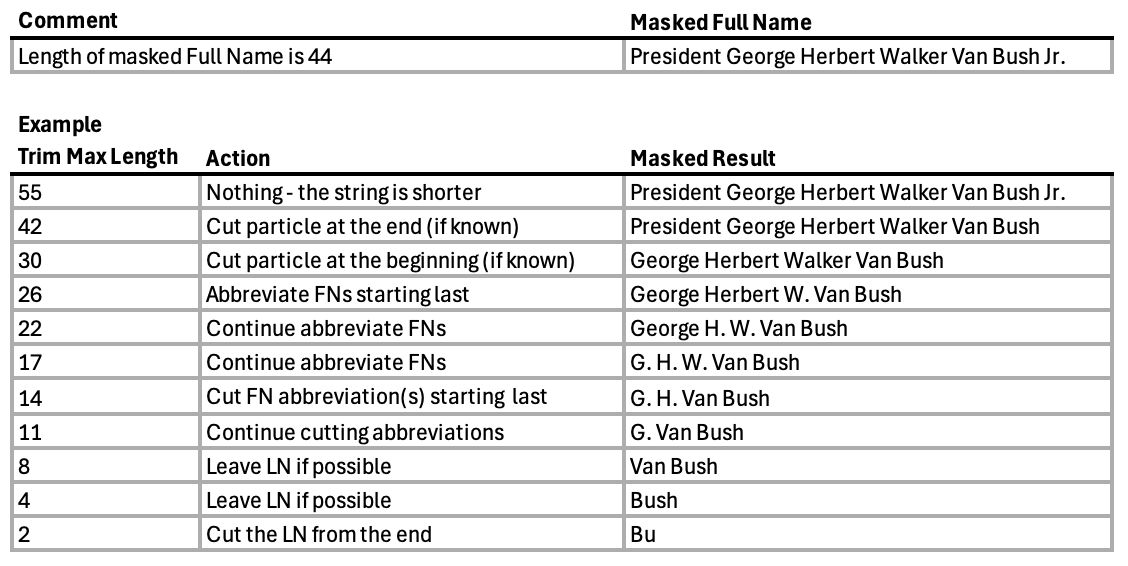
The chained instances for First Name and Last name masking can be any existing extensible algorithm instance that masks the String type. However, it is recommended to use the instances based on the Name framework. Particles can only be considered for Name framework algorithms, and it’s recommended that the First Name and Last Name algorithm instances have the same particle files.
Configuration options
| Option | Description |
|---|---|
| First Name Algorithm | (Required) Choose from the existing extensible algorithms of String type. |
| Last Name Algorithm | (Required) Choose from the existing extensible algorithms of String type. |
| Maximum First Names | (Optional. Integer. min value = 1, max value = 4, default = 2) Total number of first/middle names to be masked. The rest would be ignored. |
| Maximum Masked Full Name Length |
(Optional. Integer. Default is 0) This number should be >= 0 (i.e. not negative). This is the maximum number of characters for the masked output string. The masked result is “smart trimmed” to fit that length (see explanation and example table above for details on smart trimming). Value 0 means length is unlimited. We also try to detect the length of the destination field. Some Data Sources provide that value, while others don't. For example: if Data Source provides value 10 for the destination column length and current configuration field is set to 0 or any value longer than 10 - the shortest value wins, i.e. in this example masked result would be trimmed to 10 characters.
|
| Full Name Convention |
(Optional. Enum. Default: "First-Middle-Last") The dropdown menu provides a choice of 2 values:
This configuration helps the Full Name algorithm distinguish between first name(s) and last name if the Last Name Separator(s) are not configured or not detected in the input string. |
| Consider Single Word Input as Last Name | (Optional. Boolean. Default is true) If chosen (default case) - consider the single word input as a last name. Otherwise as a first name. |
| Last Name Separators |
(Optional. List. Default: contains comma ',') by clicking on edit icon using the List editor section. You can add a single punctuation mark (but hyphen '-' and dot '.', which are reserved for another logic) which will serve for identifying the last name in the input. The first identified separator makes that distinguishing, the rest are ignored. By default, a comma is included as a separator. An example of how the last name separator works:
|
Create an algorithm using this framework
To create an algorithm using this framework, follow the steps in Create an algorithm and select FullName during the Configuration step.