
Overview
A Bookmark is a named, human-readable reference to a specific point-in-time on a PaaS DB or PaaS Instance timeline. Bookmarks are used to mark validated, curated states — most commonly after a masking workflow — and to share those states with downstream users and environments.
Bookmarks differ from snapshots in that they represent a trusted, intentional marker with visibility, retention, and sharing controls. A snapshot is a raw point-in-time capture; a bookmark is a curated reference to a meaningful state.
Usage
-
After masking is complete on a golden copy, Bookmarks can be used to mark the validated masked state for downstream provisioning.
-
After a significant database event (schema migration, release milestone, data load), Bookmarks can be used to preserve a known-good reference point.
-
Bookmarks can be used to share a specific point-in-time with another team or non-production environment.
-
Bookmarks can be used to retain a specific point beyond the cloud provider's rolling automated backup window.
Creating a Bookmark initiates a new snapshot of the database at the bookmarked point-in-time. This snapshot is retained according to the bookmark’s configured retention period, independent of the cloud provider’s rolling automated backup window. The bookmark references this snapshot as its anchor point.
Bookmarks can only be created from DCT-managed snapshots. Cloud provider-automated backups discovered during telemetry cannot be used as a bookmark source. Only snapshots explicitly taken through DCT are eligible.
Bookmarks created on one PaaS DB can be used as a provisioning or refresh target on any other PaaS DB or Instance that shares the same root source, provided the bookmark's visibility is set to Public.
To use a bookmark in a downstream workflow:
-
Provision: In the provisioning wizard, select Specific bookmark as the point-in-time option, then choose the bookmark from the list.
-
Refresh: In the refresh wizard, select Specific bookmark as the restore point, then choose the bookmark.
Create a Bookmark
-
Navigate to the PaaS DB or PaaS Instance details page.
-
Select Actions > Create Bookmark from the top-right dropdown.
-
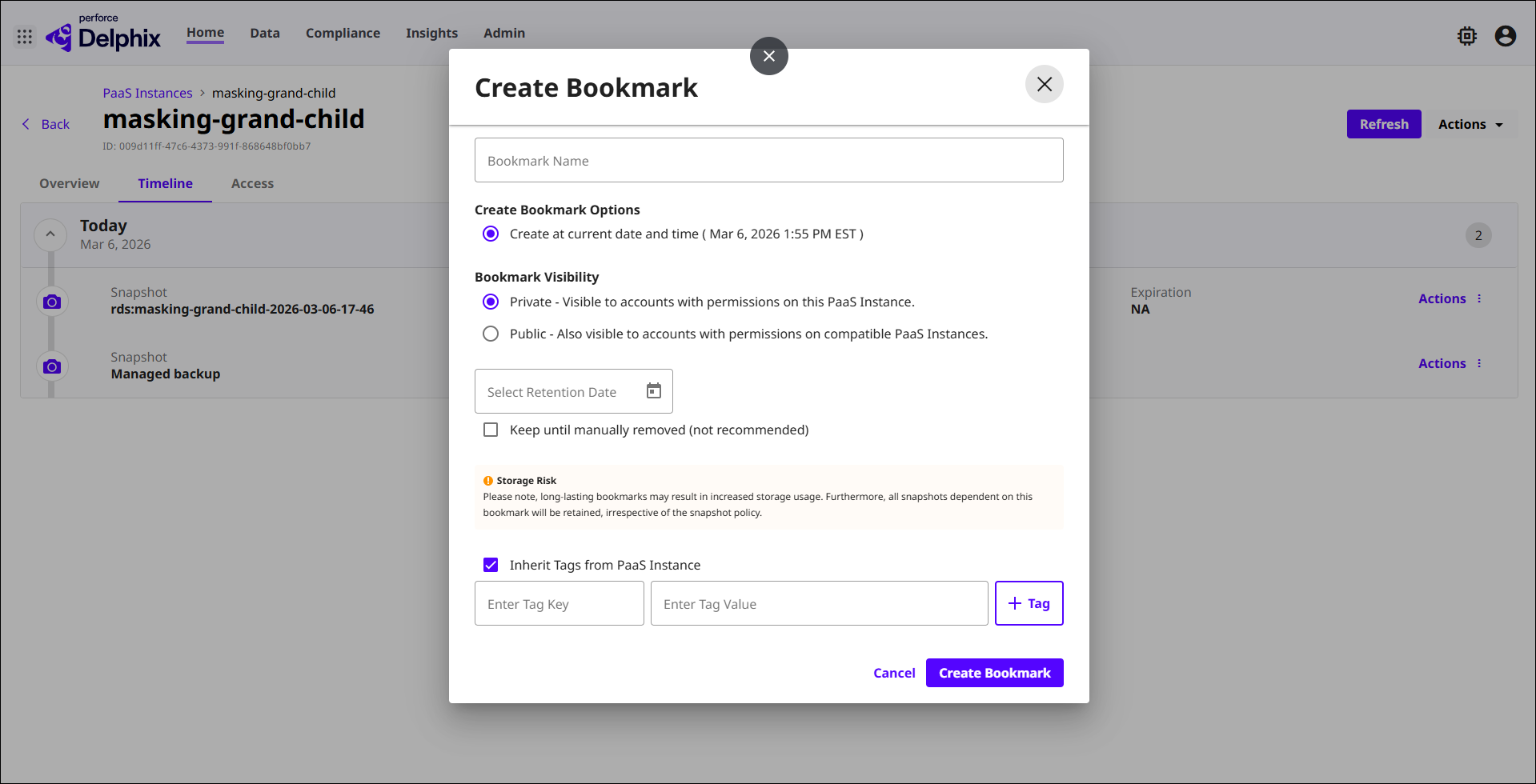
Complete the Create Bookmark wizard fields as described below.
-
Name: A meaningful label for the bookmark (e.g., "Q1-2026-masked-prod"). This name appears in the Bookmarks tab and in the provisioning and refresh wizards.
-
Point-in-time: The point on the timeline to bookmark. Defaults to the current time. For bookmarks created after masking, this captures the current masked state of the database.
-
Visibility: Public — the bookmark is visible to all PaaS DBs and Instances sharing the same root source within the same region. Private — the bookmark is visible only within this PaaS DB or Instance.
-
Retention: How long DCT will retain this bookmark before automatic deletion. Set an appropriate retention period based on how long downstream teams will need access to this dataset.
-
Tags: Optional DCT tags. Inherits tags from the parent dataset by default. Use tags to organize bookmarks and apply access control.
-
Submit: Select Create Bookmark. The bookmark appears immediately in the Bookmarks tab of the PaaS DB or Instance. If visibility is set to Public, it also becomes available in the Bookmarks tab of other PaaS DBs and Instances sharing the same root source within the region.
-
Manage bookmarks
All bookmarks associated with a PaaS DB or Instance are visible in the Bookmarks tab of the details page. From this tab, you can:
-
View bookmark details: Name, creation date, expiration date, data timestamp, visibility, and tags.
-
Update retention or rename: Select the bookmark and choose Edit.
-
Delete: Remove the bookmark from DCT. Deleting a bookmark does not affect the underlying snapshot or backup data.