
Configuration
LDAP/Active directory can be used to authenticate login requests, and optionally to retrieve additional information about accounts, thereafter referred to as LDAP Search.
Configuring authentication
The following attributes must be set to configure LDAP/Active Directory authentication.
| Property name | Description |
|---|---|
|
enabled |
Whether the LDAP/Active Directory feature is enabled. |
|
auto_create_users |
Whether DCT must automatically create account records for successful authentication attempts using a username which does not match any accounts. If this is disabled, an administrator must create a DCT account with an ldap_principal attribute matching the value from the LDAP/Active Directory server prior to the first login attempt. If this is enabled, any user with valid credentials in the LDAP/Active Directory server can authenticate to DCT, by default with an empty authorization set (i.e not being able to view any data or perform any action). |
|
hostname |
The host name or IP address of the LDAP/Active Directory server. |
|
port |
Port of the LDAP/Active Directory server. This is usually 389 for non SSL, and 636 for SSL. |
|
enable_ssl |
Whether the connection to the LDAP/Active Directory server must be performed over SSL. It is highly advised to use SSL. Without SSL, communication between DCT and the LDAP/Active server can be intercepted. |
|
insecure_ssl, unsafe_ssl_hostname_check, truststore_filename, truststore_password |
The SSL protocol requires the LDAP/Active Directory server to expose a certificate signed by a Certificate Authority (CA) trusted by the JDK that runs DCT. See Configuring the truststore for Kubernetes and OpenShift deployments if the certificate is not recognized. |
|
[domains].msad_domain_name |
Microsoft Active Directory only: The DNS name of a domain in the same forest as the accounts which login. DCT will append the msad_domain_name to the username provided at login to form a user principal name (UPN). Example: if the msad_domain_name is http://mycompany.co and a user logs in with username john, DCT will perform an LDAP request to the Active Directory server to authenticate john@mycompany.co. |
|
[domains].username_pattern |
If the LDAP server is not Microsoft Active Directory, the username_pattern is used to create a DN string for user authentication. The pattern argument {0} is replaced with the username at runtime. Example: If the username_pattern is uid={0},ou=People and a user logs in with username john, DCT will perform an LDAP request with DN uid=john,ou=People. |
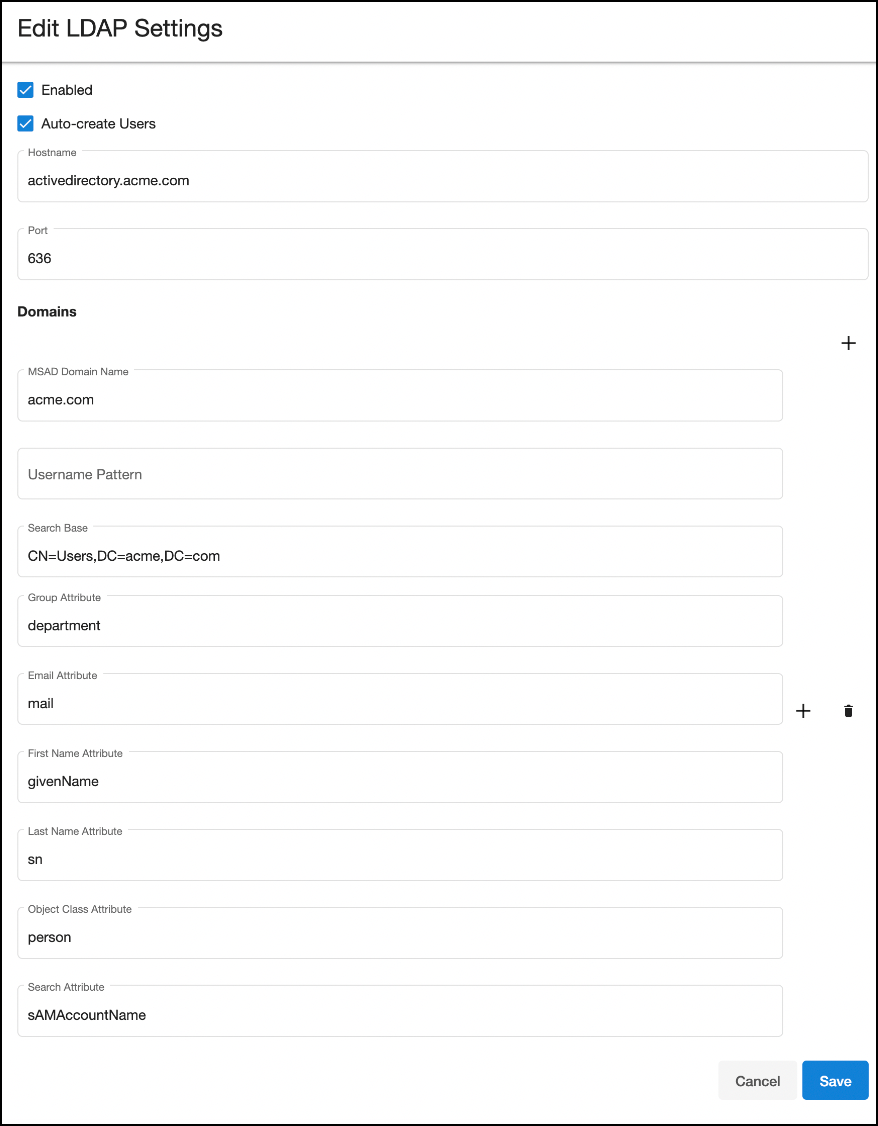
The LDAP/Active Directory Integration can be configured both via DCT UI and API. The below image shows an example of how the configuration can be set in the UI as a way to Authenticate users, auto create new users, as well as map group attributes for authorization within the DCT Access Control system.
The following example requests enable LDAP authentication over SSL with an Active Directory server at address activedirectory.company.co using the us.company.co domain:
curl --location --request PUT 'https://<hostname>/v2/management/ldap-config' \
--header 'Content-Type: application/json' \
--header 'Accept: application/json' \
--header 'Authorization: apk <your API key>' \
--data-raw '{
 "enabled": true,
 "auto_create_users": true,
 "hostname": "activedirectory.company.co",
 "enable_ssl": true,
 "port": 636,
 "domains":[{
   "msad_domain_name":"us.company.co" }]
}'
Configuring the truststore for Kubernetes and OpenShift deployments
When enable_ssl is enabled, DCT validates the LDAP or Active Directory server certificate against its truststore. If the certificate is signed by a private or otherwise unrecognized Certificate Authority (CA), add the CA certificate to the DCT truststore.
Obtain the CA certificate in PEM format and Base64-encode it:
cat mycertfile.pem | base64 -w 0Copy the Base64-encoded value to the truststoreCertificates section of the Kubernetes or OpenShift values.yaml file:
truststoreCertificates:
<certificate_name>.crt: <base64 encode certificate string value in single line>
The truststore can contain CA certificates for both LDAP or Active Directory servers and Delphix Engines. Add each certificate as a separate entry when the connections use different certificate authorities.
After updating values.yaml, apply the configuration by upgrading the Helm release and restart the required DCT pods so they load the updated truststore. For more information, see TrustStore for HTTPS.
The insecure_ssl property bypasses certificate validation. Use this option only when you understand the security risks. Prefer adding the correct CA certificate to the truststore.
Validating the configuration
Updating the LDAP/Active Directory configuration does not guarantee that the provided values are correct, as validating those requires a user to authenticate to DCT. This can be achieved with the ldap-config/validate API endpoints, using the credentials valid for the LDAP/Active Directory server. When provided with a username/password combination, the ldap-config/validate API endpoint will authenticate with the LDAP server. If the response status code is 200, the configuration is correct. Otherwise, the response code will be 400, and the response body will provide information to resolve the configuration problems. For example:
curl --location --request POST 'https://<hostname>/v2/management/ldap-config/validate' \
--header 'Content-Type: application/json' \
--header 'Accept: application/json' \
--header 'Authorization: apk <your API key>' \
--data-raw '{
 "username": "<ldap-username>",
 "password": "<ldap-password>"}'
Because of a defect in version 3.0.0 of DCT, the above request might fail with a response similar to:
search failed for john.doe with search base null' ,search attribute 'null'This indicates that authentication works, and search (see below) is not configured.
Login
Once the configuration has been updated, accounts can login (via the UI or API) using the same UI form/API endpoint they would be using for the local username/password authentication feature. For example:
curl -k --location --request POST 'https://<hostname>/v2/login' \
--header 'Content-Type: application/json' \
--header 'Accept: application/json' \
--data-raw '{
 "username": "<ldap-username>",
 "password": "<ldap-password>"}'
When LDAP/Active directory is enabled, DCT first attempts to validate passwords with the LDAP/Active Directory server, and falls back to local password authentication in case of failure. Enabling LDAP/Active directory is thus a non disruptive operation for existing accounts.
In order to force a transition to LDAP/Active Directory only password authentication, the DCT administrator must either update the account records to remove the password, or disable local password authentication entirely.