
Action required: The Continuous Data UI, API, and CLI are scheduled for end of life. Review the latest migration guidance and start planning your transition to Data Control Tower.
On new engine installations of 2026.5.0.0 and later, the Admin UI opens directly to the Performance Dashboard, and the Manage, Resources, and System menus are unavailable. Engines upgraded from an earlier version keep full Admin UI access. This restriction cannot be changed by customers; contact Delphix Support if you need it lifted temporarily.
Learn more about the Continuous Data end-of-life announcement.
This topic describes the process of failing over a replica. Objects stored in a replica are read-only, and failing over a replica moves the replicated objects to the live system. After a failover, all of the objects will appear in the system as if they had been created locally.
Prerequisites
-
A Delphix system that contains a replica is required.
-
For an overview of what replicas are and what failover implies, see Replicas and Failover.
-
For more information on configuring replication, refer to the Configuring Replication topics.
Procedure
-
On the replication target engine, locate the replica to fail over.
-
Click System.
-
Select Replication.
In the Received Replicas section, you will see the list of replicas. Each replica has a default name which is the hostname of the source that sent the update. If you wish, you can customize these names. Each replica will list the databases and environments it contains.
Check whether the replication source engine is still active. If it is, disable the dSources and VDBs included in the replica on the source engine before failing over the replica on the target. On the source engine, click Manage > Datasets, click the database, and click Disable in the Actions menu. Repeat these actions for every dSource and VDB included in the replica. Confirm that all of them are disabled on the source before continuing.
To send the latest data after disabling the objects, open System > Replication on the source engine, click the replication profile, and click Replicate Now. Wait for the update to complete before failing over on the target. If no platform-specific preparation or conflict resolution requires another update, you can skip this update when the data from the last successful replication meets your recovery needs.
For data migration, send a final incremental update after disabling the source objects and before failing over the target. The optional freshness update above does not replace the migration procedure. See Data migration.
For Oracle vPDBs, disable the vPDB on the source, send a replication update, and confirm that it completes before failing over and enabling the vPDB on the target. This update is not optional merely because older data is acceptable. See Considerations for virtual pluggable databases. Also complete any required manual conflict resolution before failover.
Repoint scripts that access the source engine to the replication target so that they do not restart VDBs on the source.
-
-
On the replication target engine, click Failover and a confirmation dialog appears. To perform a test-failover, read Test-failover and Failback and confirm in the dialog. For a regular failover, uncheck the option and confirm.
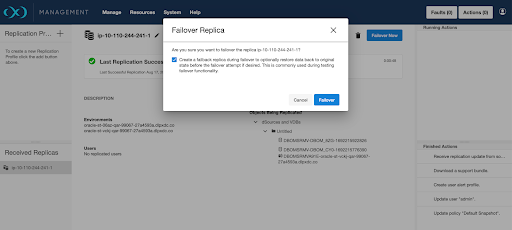
This will pause while the replica is failed over.
-
When failover completes, the replica page will update.
-
On the replication target engine, apply any configuration changes that are required to customize the objects for the system. This might include updating object states such as IP addresses, mount paths, or credentials. For more details, see the Replicas and Failover topic.
Before you re-enable configurations after failover, install on the target engine any certificates that were installed in the source engine TrustStore. This is required for configurations that rely on certificate trust, including replication client authentication and certificate-based password vault integrations.For SQL Server staging and target environments, remove stale iSCSI persistent targets, target portals, and sessions that still reference the source engine before re-enabling datasets. If these entries are retained and a replacement engine is later deployed with the original IP address, hosts can continue attempting discovery and login against invalid target definitions. For cleanup steps, see SQL server environments and data sources.If the dSources and VDBs that were failed over belong to a plugin, depending on what version of the plugin existed on the target engine, the plugin may be in an inactive state. The plugin must be moved out of the inactive state before the object can be enabled. For more information see the Delphix Engine Plugin Management topic. -
On the replication target engine, enable the environments that were failed over.
-
Click Manage.
-
Select Environments. The environments that were failed over will be disabled.
-
From the Actions menu (...) select Enable.
-
-
Refresh any environments that were consolidated during failover.
-
Click the Refresh icon for each affected environment.
-
-
Enable the dSources and VDBs that were failed over.
-
Click Manage
-
Select Datasets.
-
Select the desired database.
-
-
From the Actions menu (...) select Enable.
After replication failover
Preserve the replication profile on the source engine while failback remains an option. After a test-failover, the target needs that profile to receive updates following failback. See Failback.
After permanent failover, delete the obsolete replication profile on the source engine when it is no longer needed. On the source engine, open System > Replication, click the profile under Replication Profiles, and click the delete icon (trash can). For prerequisites and the CLI procedure, see Delete replication profiles.
A failover is similar to a migration operation for TDE-enabled vPDBs. If after the failover the original target hosts are still available, then the vPDB can be enabled on the failed over Delphix Engine without requiring additional manual steps. If the vPDB is to be restored to a different target host, then the same manual steps are required for migration, as the vPDB will now be located on a new target and thus needs the artifact directory, parent Keystore, and merged Keystore available.