
This topic covers procedure to enable and disable the MSSQL_EXPAND_VOLUME__BEYOND_63TB parameter via CLI:
Enable the MSSQL_EXPAND_VOLUME_BEYOND_63TB parameter
-
Log in to CLI using sysadmin
-
On the CLI type the below mentioned commands to enable the parameter:
> system > enableFeatureFlag > set name=MSSQL_EXPAND_VOLUME_BEYOND_63TB > commit -
After those commands are committed and executed, the parameter will be enabled.
-
We can verify the list of enabled parameter using the below mentioned command:
> get enabledFeatures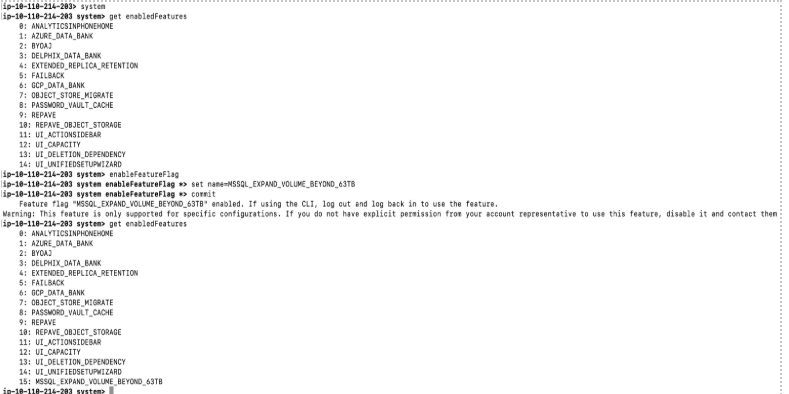
Disable the MSSQL_EXPAND_VOLUME_BEYOND_63TB parameter
-
Log in to CLI using sysadmin
-
On the CLI type the below mentioned commands to disable the parameter:
> system > disableFeatureFlag > set name=MSSQL_EXPAND_VOLUME_BEYOND_63TB > commit -
After those commands are committed and executed, the parameter will be disabled.
-
We can verify the FF is not there in the list of enabled parameter using the below mentioned command:
> get enabledFeatures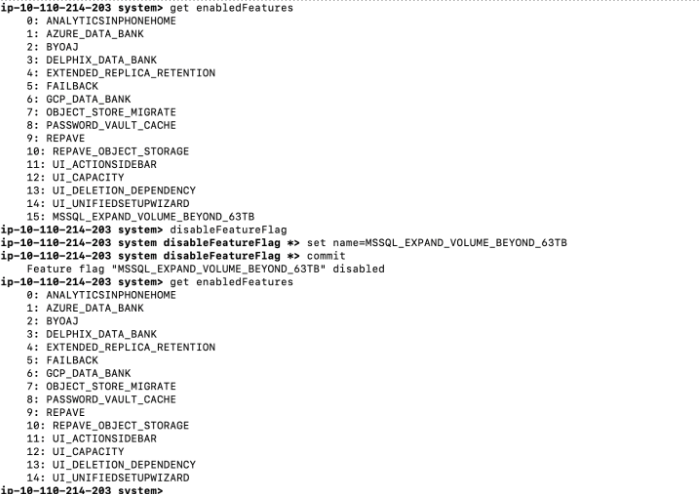
Last updated
Oct 9, 2026