
Go to the hyperscale-helm chart directory. Under the templates folder, locate the corresponding <service-name>-deployment.yamlfile. For more details, refer to the below screenshot.
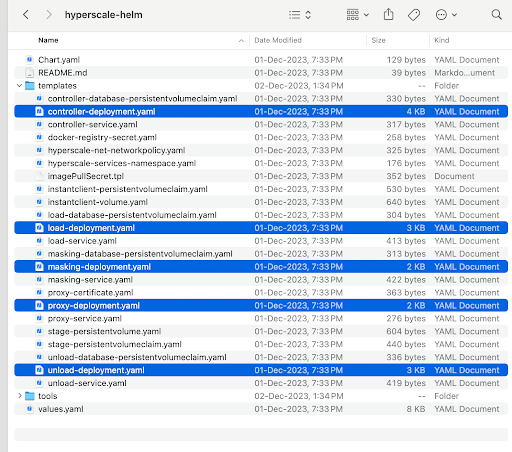
Open the corresponding <service-name>-deployment.yamlfile for which you want to modify the new configuration.
Example: Let’s suppose you want to change the config value for API_KEY_CREATE in controller-deployment.yaml file. As you can see that API_KEY_CREATEconfig value is mapped with Values.controller.apiKeyCreate.
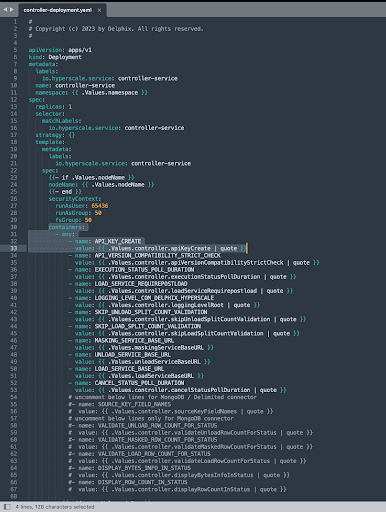
Now under the hyperscale-helm chart directory, open the values.yaml file and search for apiKeyCreateproperty of controller attribute and change the corresponding value.
Add a new configuration for any service
In case the configuration name doesn’t exist in <service-name>-deployment.yaml file, add your configuration as part of env in <service-name>-deployment.yaml file and also define config with the same name in values.yaml corresponding to the service environment as explained above, to get the values from values.yaml file.
Apply helm upgrade to reflect the new values.yaml file changes.
helm upgrade hyperscale-helm -f hyperscale-helm/values.yaml hyperscale-helmYour docker-compose Hyperscale VM is now fully migrated to Kubernetes Hyperscale VM. Check the k8 running pods, like below:
delphix@hyperscale-k8s:~/_database$ kubectl get pods -n hyperscale-services
NAME                                  READY   STATUS    RESTARTS   AGE
masking-service-7788ccbbbb-lnzhv      1/1     Running   0          4h28m
unload-service-5f9946556f-4qg7l       1/1     Running   0          4h28m
proxy-767d6ccbdd-2vdhv                1/1     Running   0          4h28m
load-service-5bb994dbbf-c85mz         1/1     Running   0          3h43m
controller-service-6c6df56bbd-blng6   1/1     Running   0          62m
database-service-77867yfgbb-lwohv     1/1     Running   0          4h29m
If apiKeyCreate property is defined as true in values.yaml, then you can get the API-Key as below to access the API. In case, apiKeyCreate property is defined as false then you can use your existing API-Key.
kubectl logs <controller-pod-name> -n hyperscale-services | grep 'NEWLY GENERATED API KEY' | sed 's/^.*: //'